

- Register with Amazon for an Amazon Payments Seller Account to obtain a Seller ID. You can create an Amazon Payments Seller account or provision an existing Seller account by signing up for Login and Pay with Amazon from the Amazon Payments portal using this URL: https://sellercentral.amazon.com/hz/…=ADLX5FKV396A7 Vindicia recommends that you register with Amazon at least 14 days prior to launch of the new payment method on your site.
- Authorize Vindicia (through the Amazon portal) to conduct transactions on your behalf (associates Vindicia’s Partner API key to operate with your account). This option is automatically offered at the end of the sign up using the above link.
- Request the configuration of this payment method from Vindicia Support, and provide your Seller ID for use in the configuration. Vindicia uses your Seller ID along with transaction-specific credentials passed during the buy process, but also uses its own API Key and ID to identify any transactions as being conducted on your behalf specifically by Vindicia.
- Plan for incorporating the Amazon Payments option within your customer facing buy flows or checkout processes. In addition, plan to support subscriber self-service with regard to updating Address and Payment Method selections.
-
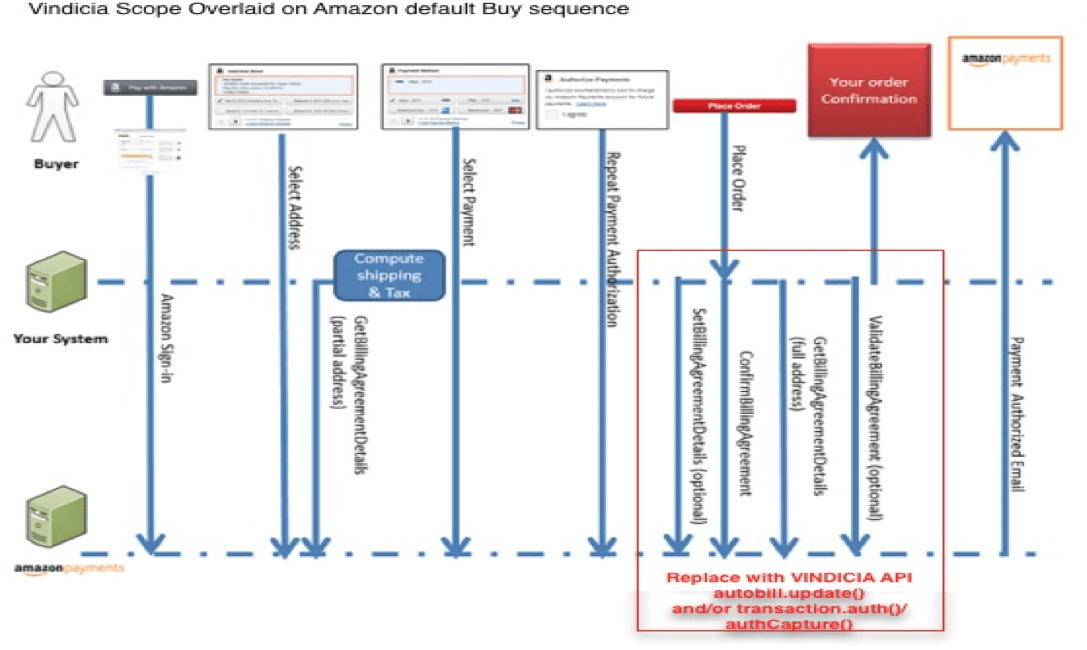
Reference Amazon Payments’ latest Integration Guides for development. Both the Login and Guest paths can work with Vindicia’s integration. The basic sequencing (from the Amazon documentation) is below.
-
Alter the recommend sequence (from the Amazon Payments Integration Guide) as follows:
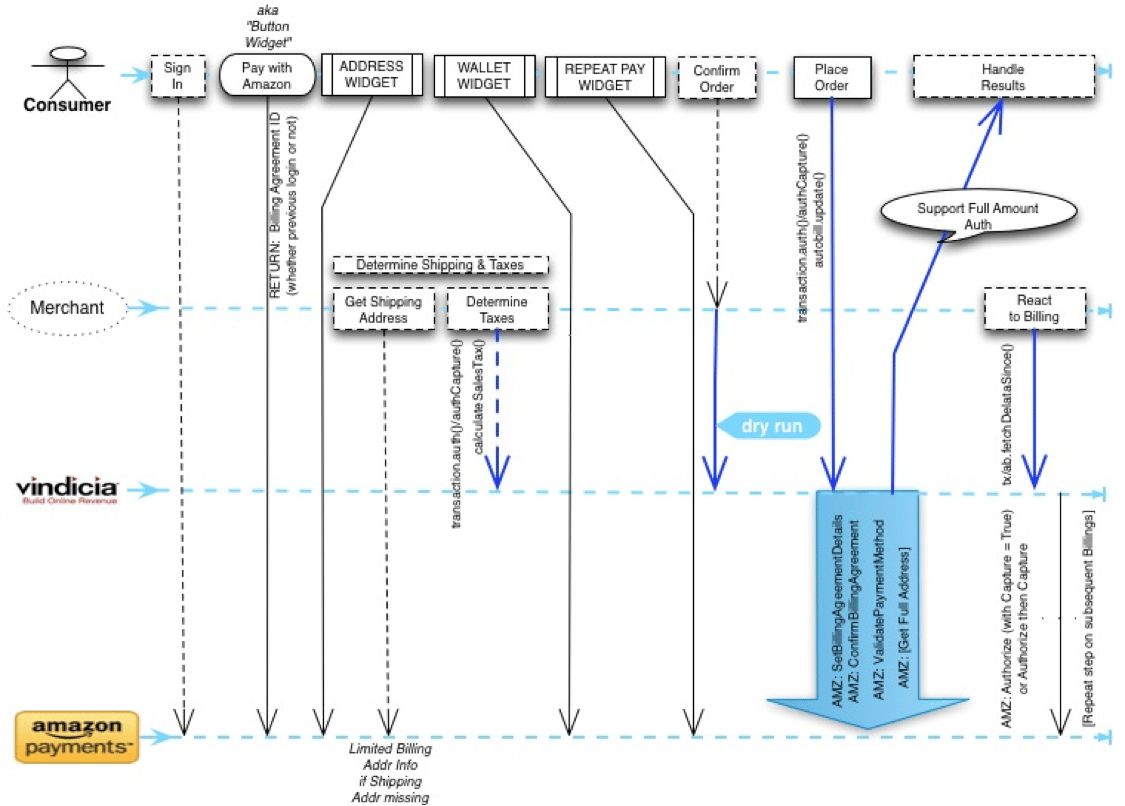
- Capture the Billing Agreement ID from the Amazon interactions, which is used as the unique identifier for this purchase/subscription.
- If Shipping Fees are included, use the Off Amazon API methods to get the Shipping Address relevant for the subscriber’s selections for this Billing Agreement and populate that Shipping Fee as a Subscription Item to be used with the upcoming autobill.update() method call (or as a Transaction Item for use in the upcoming Transaction if this is a one-time purchase).
-
To support a pre-purchase Confirmation Page (if desired), construct the Subscription in accordance with your Vindicia Subscribe implementation design, and use Vindicia API autobill.update() with
dryrun=trueto establish the pre-tax fees and purchase detail from the synchronous return. For simplicity, Vindicia does not recommend that you quote with Tax charges. However, if this is desirable, after the Shipping Address Step (see diagram above) follow your Vindicia Subscribe implementation design to determine tax amounts (using a transaction.auth() method). This amount is then displayed appropriately on the Confirmation Page along with an adjusted total. - When the user accepts the order, complete the construct of a suitable local Subscription object and pass it using the standard Vindicia API autobill.update(), specifying a Payment Method Type of Amazon with the Billing Agreement ID and the relevant Client ID for this purchase. If this is a one-time purchase, transaction.auth() and transaction.capture() or transaction.authCapture() can be substituted above for the Subscription methods. Note: It is not necessary to pre-define the Amazon Payment Method on an Account before its use. However, if the Billing Agreement ID is known, it can be recorded against an Account using the typical Vindicia API methods. Amazon Payment Methods cannot be recorded using the Vindicia Subscribe portal.
- The immediate reaction to the purchase results can be determined from the synchronous return of the Vindicia API method as with any other Payment Method. Additional detail is available as usual from the various fetch methods such as autobill.fetchDeltaSince and transaction.fetchDeltaSince, and more granular/targeted equivalent calls.
- User Self-Service to update Address or true Payment Method selection within the Amazon widgets does not require interaction with Vindicia Subscribe (Vindicia Subscribe determines the up-to-date settings upon the next scheduled or ad-hoc interaction for the existing Billing Agreement).
- Standard Vindicia Subscribe implementations apply to cancelations, upgrades/modifications, and refunds. Vindicia Subscribe interacts with Amazon directly as needed based upon the Billing Agreement ID provided with the original Payment Method definition.
- Barring other agreements with Amazon Payments, this payment method is optional and can be offered alongside other methods (for example, Credit Card).
- Any subsequent charges including from upgraded/modified versions of the existing purchase/subscription use the established Billing Agreement. Note: Initially Amazon limits total monthly charges for an individual Billing Agreement to $500 USD. This limit can be altered by agreement with Amazon Payments.
- Transaction Success and Failures are recorded and presented in the same manner as with any Vindicia Subscribe-supported Payment Method, using Amazon’s appropriate Response Codes and Error messages.