Applying Currency Credit to a Subscriber Account
You can make currency credit purchases available to subscribers by creating currency credit products in the Vindicia Subscribe catalog, usually configured at fixed values such as 25, $100, and so on. To add currency credit to an account, the subscriber purchases the currency credit product using an external payment method already associated with their account, such as a credit card, PayPal account, or other. For general information about adding a product to a catalog in Vindicia Subscribe, see:- Create or Edit a Product Catalog
- Products in the Vindicia Subscribe REST API Guide
- Products in the Vindicia Subscribe Client Portal User Guide
[Transaction.authCapture\(\)](https://vindicia-ext-prod.zoominsoftware.io/bundle/SOAPAPIGuide/page/topics/Transaction_authCapture.html) call to capture the transaction (as with all transactions for purchases of goods or services). After the transaction is captured, apply the currency credits to the customer account using the [Account.grantCredit\(\)](https://vindicia-ext-prod.zoominsoftware.io/bundle/SOAPAPIGuide/page/topics/Account_grantCredit.html) call.
For information about applying currency credit to an account, see Grant Currency Credit to an Existing Subscription.
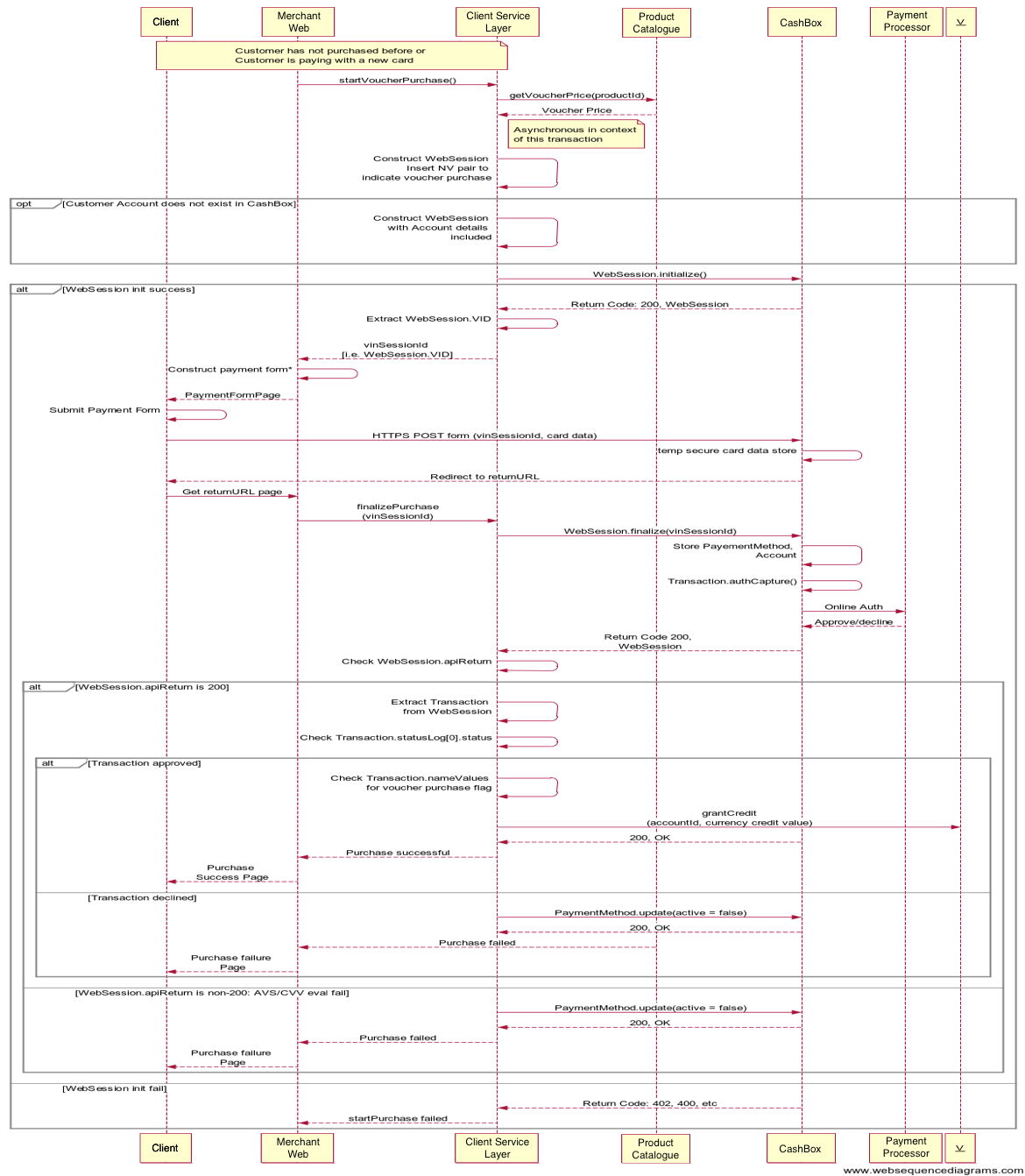
The following diagram illustrates the call sequence using Transaction.authCapture() to capture an initial transaction for a currency credit purchase by a customer using a credit card. (This sequence diagram does not include the Account.grantCredit() call applying the currency credit to the Account object.)
Using Currency Credit to Pay for Purchases
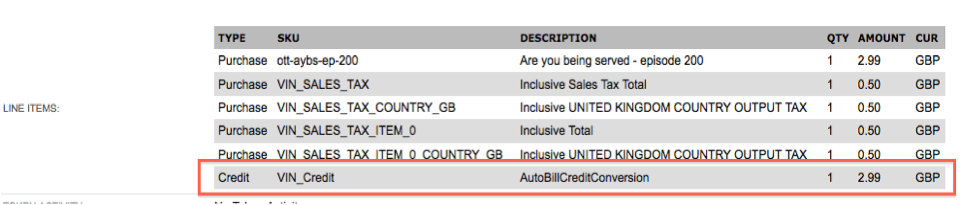
A subscriber who has currency credit on an account can apply the credit to pay for subsequent purchases. If currency credits are available on a subscriber account, Vindicia Subscribe automatically applies all available credit to a subsequent purchase transaction to pay the transaction charge. For example, if a subscriber account has a 2.99, Vindicia Subscribe applies 2.99 to the transaction and deducts the credit value from the total transaction price. The net transaction amount is 0, and no charge is made against any alternative payment method on the account. \(The subscriber account does not need to have an alternative payment method available for transactions paid using currency credits.\) After the transaction is processed, the subscriber account has a currency credit balance of 17.01. The following figure shows an example of a transaction paid with currency credit, as displayed in the Vindicia Subscribe Portal (the example uses British pounds rather than dollars as currency).