

- Use Case Number: 2-4-12
- Completed By: Software Developer
- Estimated Completion Time: <1 day
Basic Scenario
The Subscriber logs in to your self-care portal and enters a promotional code to upgrade their subscription at a discount. The subscriber’s existing Subscription must be in Good Standing or in Soft or Hard Error, and the Subscription end date must not be in the past.Design Approach
As shown in the following diagram, you must post the change and campaign code to the subscription endpoint, indicating which products/items on the subscription are to be replaced, and optionally providing a new billing plan if the billing frequency is also going to change. If the upgrade fails due to an inability to collect the funds, you must request a new payment method using PMT and resubmit the subscription upgrade with promotion using a new payment method.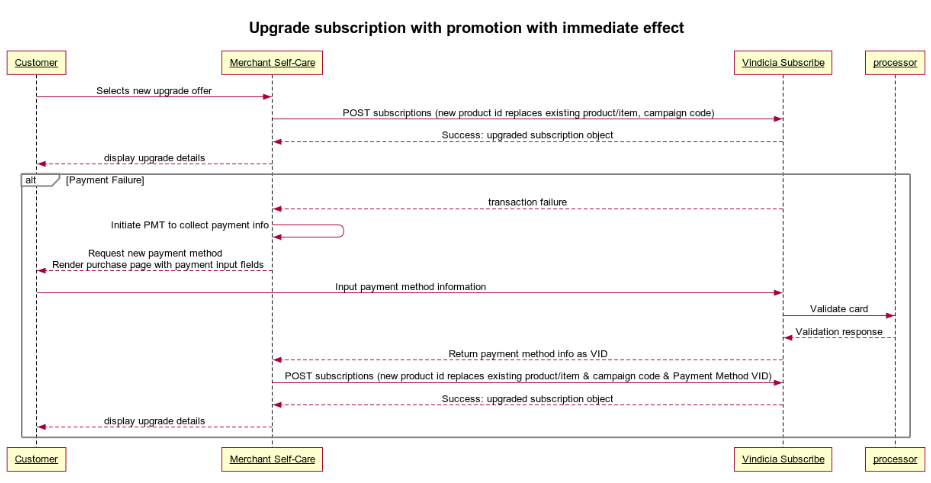
Upgrade Subscriptions with Promotional Rate Using Subscribe APIs
Set up a promotional rate for the upgrade (see Set Up Promotional Pricing). To enable subscribers to upgrade Subscriptions with promotional rates:-
POST the subscription change to the subscriptions endpoint.
Sample Code:
https://github.com/Vindicia/CashBoxRESTCodeSamples/blob/master/Autobill/subscription_modify_monthly_to_annual_with_promo.txt
You must provide Subscribe with the following information to perform the upgrade using the API:
- The item ID on the subscription that you wish to replace/upgrade. (An item represents a current product on the subscription.)
- The old product ID for the item being upgraded.
- The new product ID for the upgrade.
- A new item ID for the item being created (this identifies the new product being added to the subscription).
- (optional) The new billing plan ID. (Only required if you wish to change to a new billing plan.)
- The date when the upgrade is effective. (options:
effective_date=todayoreffective_date= nextBill)- This use case specifies today to have an immediate effect.
- Whether the upgrade is prorated. (options:
billing_prorated_period=trueorfalse) - The campaign code to use for the promotion.
- If the upgrade fails due to inability to collect funds, request a new payment method from the subscriber using PMT and resubmit the change with the new Payment Method VID.
- The Subscription contains the new product and the old one has been marked as removed.
- The new billing plan is in place (if applicable).
- Future billings are correctly predicted.
- The Account has been granted appropriate Entitlements.
- A transaction is generated if applicable, including any applicable taxation.
- A discount (% or flat rate) is applied at the time of purchase and is reflected in the Transaction and tax charges (if applicable).