

- Use Case Number: 2-4-13
- Completed By: Software Developer
- Estimated Completion Time: <1 day
Basic Scenario
A subscriber logs in to your self-care portal and chooses to downgrade their Subscription. The Subscriber’s existing subscription must be in Good Standing, or Soft or Hard Error, and the Subscription end date must not be in the past.Design Approach
As shown in the following diagram, your must post the change to the subscription endpoint indicating which products/items on the subscription are to be replaced, and optionally providing a new billing plan if the billing frequency is also going to change. For this use case, this change is effective on the next billing date.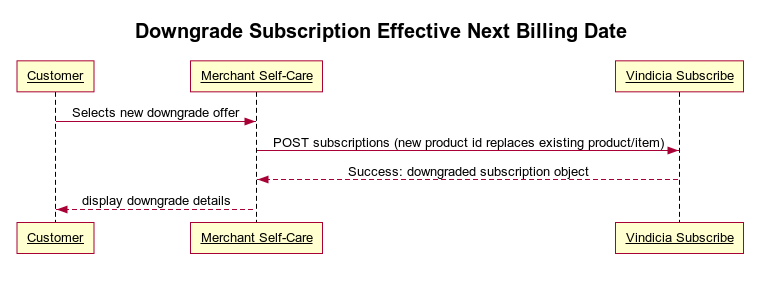
Downgrade Subscriptions Using Subscribe APIs
Determine what constitutes a downgrade. To enable subscribers to downgrade subscriptions:-
POST the subscription change to the subscriptions endpoint.
Sample Code
https://github.com/Vindicia/CashBoxRESTCodeSamples/blob/master/Autobill/subscription_modify_annual_to_monthly.txt
You must provide Subscribe with the following information to perform the downgrade through the API:
- The item ID on the subscription that you wish to replace/downgrade. (An item represents a current product on the subscription.)
- The old product ID for the item being downgraded.
- The new product ID for the downgrade.
- A new item ID for the item being created (this identifies the new product being added to the subscription).
- (optional) The new billing plan ID. (Only required if you wish to change to a new billing plan.)
- The date when the downgrade is effective. (options:
effective_date=todayoreffective_date=nextBill)- This use case uses
nextBillto make it take effect with their next billing.
- This use case uses
- The Subscription contains the new product and the old one has been marked as removed.
- The new Billing Plan is in place (if applicable).
- Future billings are correctly predicted.
- The Account has been granted appropriate Entitlements.