

- Use Case Number: 2-4-05
- Completed By: Software Developer
- Estimated Completion Time: <1 Day
Basic Scenario
The subscriber logs into your self-care portal and selects to view their available credits.Design Approach
As shown in the following diagram, you must use the merchantAccountId to GET the credits associated with the account or subscription. Credits are available at the account level and at the subscription level. When at the account level, a credit can be consumed by any subscription on the account. When at the subscription level, credits can only be consumed by the subscription they are associated with. Note: If a credit does not exist on an account or a subscription, then there is no credit object returned with the account or subscription object. After you GET the account object or subscription object, you must extract the relevant credit details to display to the user.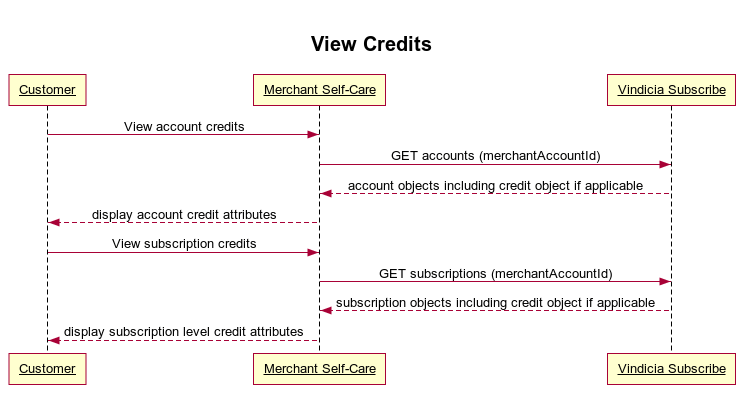
Retrieve Available Credits Using Subscribe APIs
To enable your self-care portal to retrieve available subscriber credits, use the Subscribe APIs as follows:- GET the account or the subscription related to the account.
- Extract the account level or subscription level credits to display them to the end subscriber. Sample Code: Get account level credits from the accounts endpoint: https://github.com/Vindicia/CashBoxRESTCodeSamples/blob/master/Account/getAccountWithCredits.txt Get subscription level credits from the subscriptions endpoint: https://github.com/Vindicia/CashBoxRESTCodeSamples/blob/master/Autobill/getSubscriptionWithCredits.txt