

- **Use Case Number:**2-4-04
- **Completed By:**Software Developer
- Estimated Completion Time:<1 day
Basic Scenario
The subscriber logs into your self-care portal and selects to view the history for each refunded transaction.Design Approach
As shown in the following diagram, you must use the merchantTransactionId to GET all the refunds associated with the transaction. Note: A transaction only has a refund if the latest status of the transaction is Refunded. A single transaction can have N number of refunds.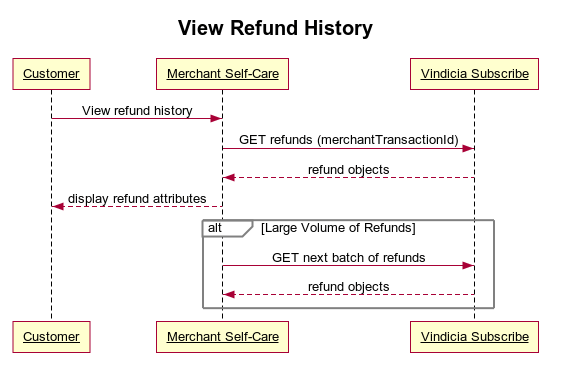
Retrieve Refund History Using Subscribe APIs
- Call the transactions endpoint using the merchantTransactionId to Get the Refund objects related to the transaction. Sample Code: https://github.com/Vindicia/CashBoxRESTCodeSamples/blob/master/Refunds/Refund.fetchByTransaction.txt
- Use the limit feature to control how many refunds are returned. If the number of refunds exceeds the limit, use the next attribute in the JSON response which will be populated with the next refund ID to start with. This ID allows you to loop through and GET the next set of refunds.
- Continue the loop until you have all the refunds you want to display.