

- Use Case Number: 2-4-02
- **Completed By:**Software Developer
- Estimated Completion Time: 1 day
Basic Scenario
The subscriber accesses their account through your self-care portal and they change non-payment related account details.Design Approach
As shown in the following diagram, you must use the merchantAccountId to update the existing account. Call the accounts endpoint to post the updated account object attribute values.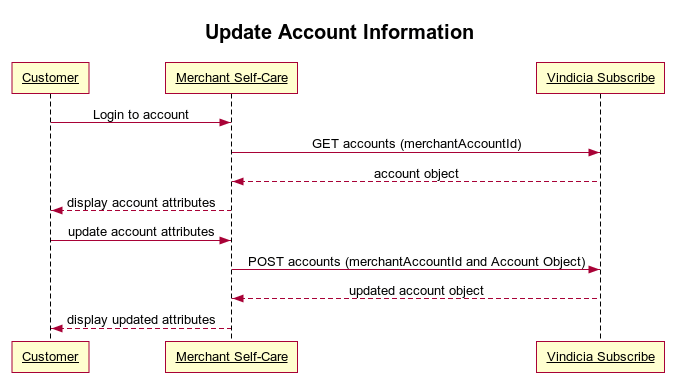
Update Non-Payment Account Details Using Subscribe APIs
To enable your self-care portal to perform updates to non-payment account information:- Call the accounts endpoint using the merchantAccountId to GET the Account object. Sample Code: https://github.com/Vindicia/CashBoxRESTCodeSamples/blob/master/Account/Account_fetchByMerchantAccountId.txt
- Call the accounts endpoint using the merchantAccountId again to POST the updated values for the Account object attributes. Sample Code: https://github.com/Vindicia/CashBoxRESTCodeSamples/blob/master/Account/Account_update(UpdateBillingAddress).txt