

- Use Case Number: 2-4-09
- Completed By: Software Developer
- Estimated Completion Time: <1 day
Basic Scenario
A subscriber logs in to your self-care portal, selects the Subscription they wish to cancel and submits the cancelation request. The Subscription to be canceled must be in active or suspended state. As a best practice, Subscribe make this cancelation effective at the end of the service period. Subscribe does not refund any partial amounts of the last billed transaction and leaves the entitlements on until the end of the service period. So the subscription goes into Pending Cancel status through the last full service period the subscriber paid for. When that service period is over, the subscription is Canceled. To learn more about Subscription statuses, see Subscription Lifecycle in the Subscribe Merchant Portal User Guide.Design Approach
As shown in the following diagram, you must call the subscription endpoint with the cancel action utilizing default parameters to handle the best practice. For more information, see Cancel a subscription.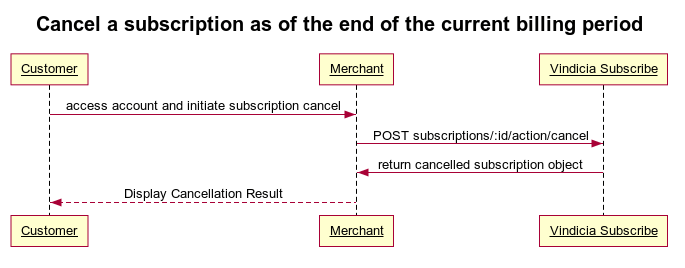
Cancel a Subscription Using Subscribe APIs
To enable your subscribers to cancel Subscriptions:-
Call the subscriptions endpoint using
POST https://api.vindicia.com/subscriptions/:subscription/actions/cancelcommand. The subscription by default is disentiled at the end of the current billing period. For more details and instructions, see Cancel a Subscription in the Subscribe Rest API Guide. Sample Code: https://github.com/Vindicia/CashBoxRESTCodeSamples/blob/master/Autobill/subscriptionCancel.txt
- The Subscription is in the Pending Cancel state.
- Entitlements are valid until the end of current billing period.
- At the end of the current billing period, the Subscription transitions to the Canceled state.