

- Use Case Number: 2-4-07
- Completed By: Software Developer
- Estimated Completion Time: <1 day
Basic Scenario
A subscriber is notified of the failed payment attempt and accesses their account through self-care to add a new credit card payment method on one or more subscriptions.Design Approach
As shown in the following diagram, you must create the new payment method using Payment Method Tokenization (PMT) and store the payment method VID. You then call the subscriptions endpoint to modify the payment method associated with the subscription. Since the subscription is Suspended, at least one previous failed transaction exists that Subscribe needs to process immediately. It is possible that the new credit card passes validation through PMT but then subsequently fails when Subscribe attemps to bill the outstanding transaction. In this case, Subscribe prevents the new card from being added to the subscription. In this situation, you must inform the subscriber to restart the process and add a new credit card to the account/subscription.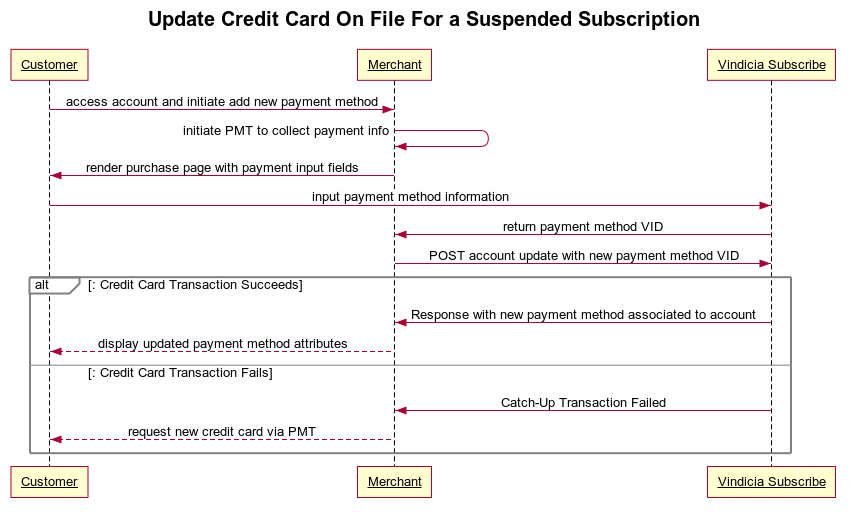
Update Invalid Credit Card Using Subscribe APIs
To enable subscribers to update invalid credit cards:- Use REST PMT to create the new payment method and get the payment method VID.
-
Use the accounts endpoint to add the new payment method to the Account, update the Subscription(s), and catch up on any delinquent billings.
POST the new payment method to the accounts endpoint with the following URL parameters:
update_behavior=CatchUp: Directs Subscribe to immediately attempt to bill delinquent charges with the new card.replace_on_all_subscriptions=1: Applies the payment method to all Subscriptions (a value of false validates and adds the new payment method to the Account only).ignore_avs=1: Ignores the AVS code, as it was completed in the PMT step.ignore_cvn=1: Ignores the CVN code, as it was completed in the PMT step. Sample Code:
- The new payment method is associated with the Subscription.
- The Subscription is ready for re-billing.