

- **Use Case Number:**2-3-01
- Completed By: Software Developer
- Estimated Completion Time: <5 days
Design Approach
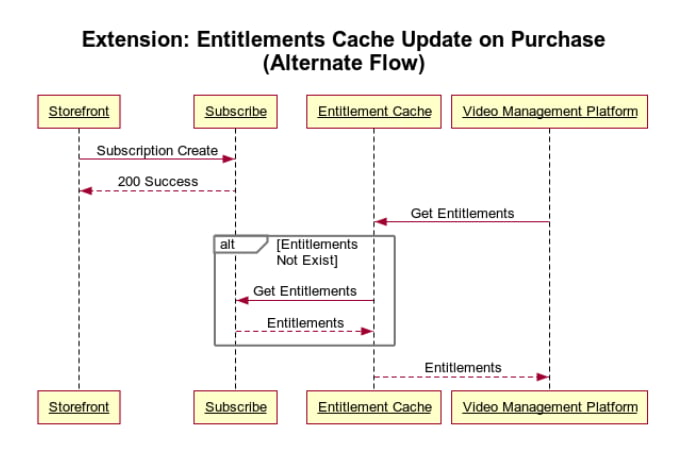
Your digital content management platform needs to be able to efficiently query a subscriber’s current entitlements to allow the subscriber to access content associated with their purchased product. Vindicia’s best practice is that you create a private cache of subscriber entitlements. The entitlement cache optimizes the user experience by providing lower latency access to a subscriber’s entitlements. The cache is then referenced by your content management solution when determining what content a given subscriber has access to. To help set up and maintain your entitlement cache, Subscribe issues a specific push notification called an entitlement push notification. There is a specific push notification denoting the start of an entitlement and another specific push notification denoting the end or stoppage of an entitlement. You must build and deploy a push notification listener for these notifications and update your entitlement cache accordingly. Entitlements are granted when a user purchases a recurring subscription and continue until such time as the subscription is canceled. Vindicia recommends the Optimistic Entitlement approach meaning that, after the original purchase is made, the subscriber remains entitled until such time as their subscription is canceled. Subscriptions can be canceled by the subscriber directly or automatically by Subscribe for non-payment. In order to optimize the user experience, entitlements must be enabled immediately when the subscriber successfully purchases the subscription. It is not appropriate to wait for a push notification as that can introduce some lag time. As a result, on initial purchase or on an upgrade, update your cache directly rather than relying on the start notification. However, your push notification listener must process both start entitlements and stop entitlements. If a start is received and the entitlement is already on, just validate that the dates are the same and, if appropriate, update the entitlement dates. Note that it is expected in most cases that the entitlement will already be on. If a stop entitlement notification is received, process the stop entitlement.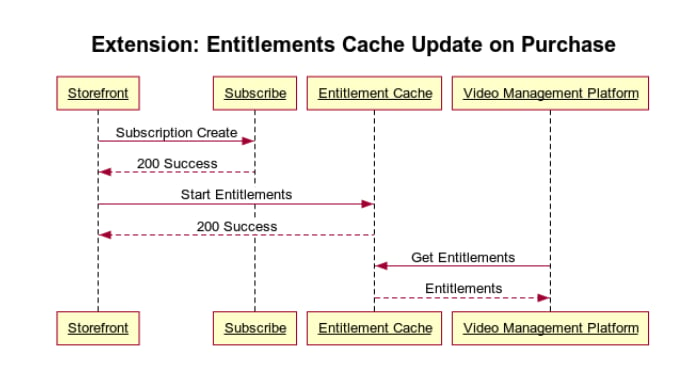
Capture Entitlement Start and End Using Push Notifications
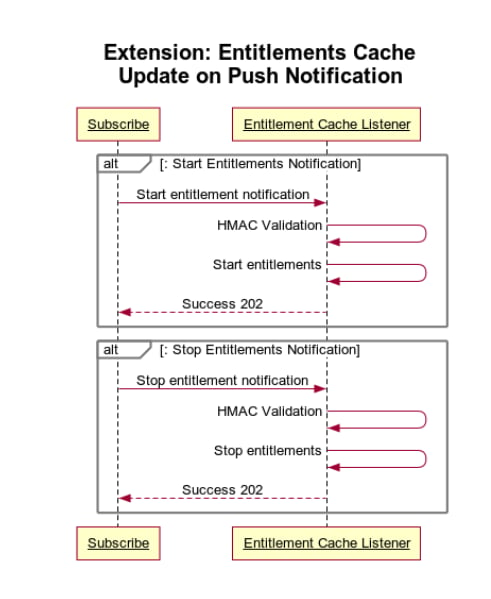
Contact Vindicia support to configure the Subscribe Entitlement Push Notifications to point to the URL of your push listener endpoint.- Implement a push listener endpoint in your system that is capable of receiving https posts from the Vindicia Subscribe servers. Your authorization system consumes the payload which contains the push entitlement notification message. Sample Code: The following video and sample code demonstrate how to build an entitlements push notification listener using Amazon Web Services as the technology platform.
- On the entitlement start date for the given season, Subscribe issues an entitlement start push notification. You must use your push listener to capture the start entitlement and update you local entitlement cache.
- Similarly, on the entitlement end date, Subscribe issues an entitlement end notification. You must use your push listener to capture that notification and update your local entittlement cache to record the end date of the given service.