- Use Case Number: 2-2-10
- Completed By: Software Developer
- Estimated Completion Time: <1 day
Design Approach
Subscribe does not have a native Identity Management Solution (IMS). Instead, you can select the IMS that best fits your needs for access management and user identification. Subscribe allows you to define the unique identification code for a given subscriber account. As a result, when integrating with an IMS, you can use the account ID of the subscriber in the IMS as the account ID for the subscriber account in Subscribe. This creates a cross reference between Subscribe and the IMS.Initial Subscriber Signup
As shown in the following diagram, during the initial subscriber signup flow, your web or mobile app storefront collects the desired subscriber information. This includes items such as user name, email address and physical address, but can also include personal information such as age, birthday, geolocation and so on. Your storefront collects and validates the information provided by the subscriber and then uses the collected information to create the user account in your IMS of choice. After the IMS account is created, the storefront can send the ID from the IMS account to Subscribe to create the corresponding account.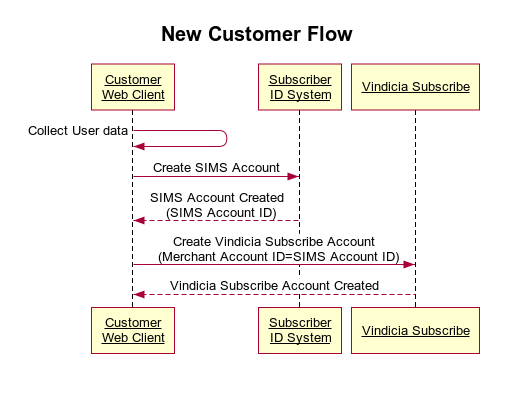
Subscriber Self Care
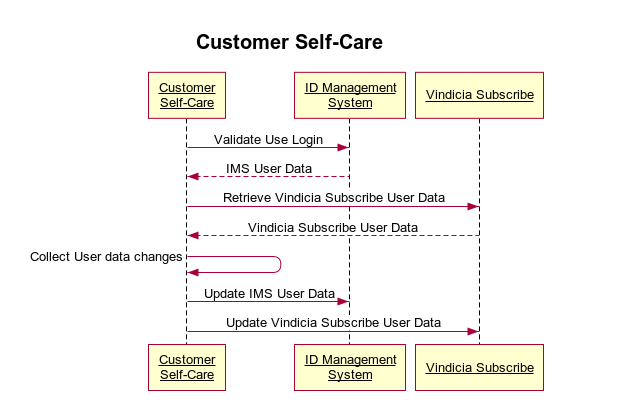
As shown in the following diagram, when a subscriber accesses their account through your self-care portal, the self-care portal retrieves the subscriber’s personal information for display on the portal from the IMS. Payment and purchase related information are retrieved from Subscribe. Note that the IMS and Subscribe may share some user information. For example, Subscribe stores the user name and email address. This information is needed if you are using Subscribe to generate email notifications or by your customer service representatives when accessing the subscriber’s account through the Subscribe portal. Subscribe also stores billing address information. This may be the same physical address information collected for the IMS. Subscribe requires some amount of physical address information to calculate the application of taxes.