

- Use Case Number: 2-2-06
- Completed By: Software Developer
- Estimated Completion Time:<3 days
Basic Scenario
A new customer accesses your storefront and selects a single-event offer to purchase. The storefront collects the customer information, including a form of payment and charges the customer for the single-event offer. You then grant entitlements for the single-event. Note: Single-event Product refers to an event in the future that lasts a finite amount of time, for example a one-time sporting event. This use case allows you to sell access to an upcoming event and grant the appropriate Entitlements (if applicable).Design Approach
You must create the single-event Product within the Subscribe Product catalog. The single-event product contains the product price, tax code if applicable, entitlements if applicable as well as any relevant metadata used to control the Entitlement grant (if applicable). In the buy-flow, you must get the appropriate single-event product and reference the product attributes to then generate a one-time transaction. Upon success of the Transaction, you must grant Entitlements for the event.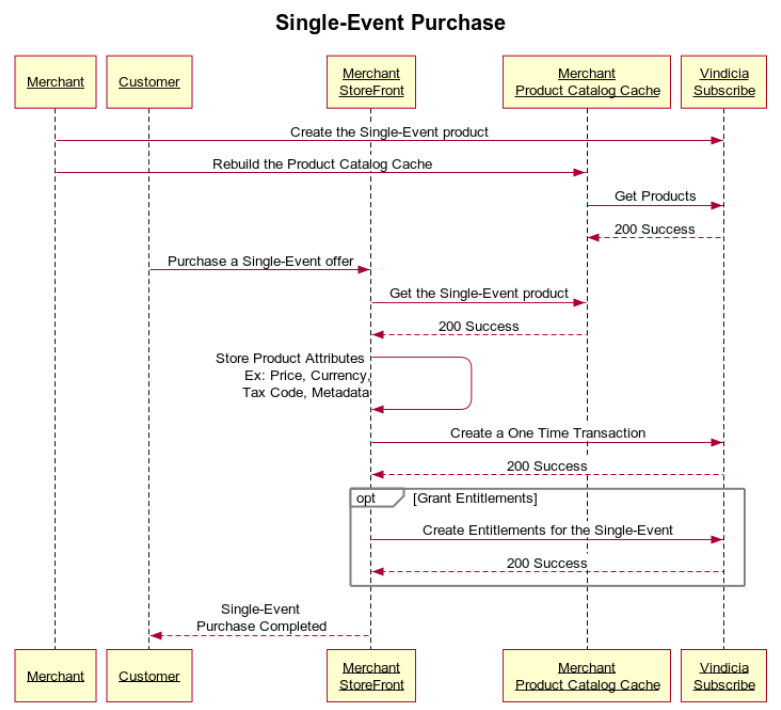
Create the Single-Event Transaction Using the Subscribe APIs
- Set up an account with your payment processor of choice.
- Ensure Vindicia has been authorized as a presenter on the payment processor account.
- Ensure that your product catalog cache is in place.
- Create the single-event product in Subscribe using either the Suscribe Portal or APIs (see Configure Single-Event Products).
- Using the products endpoint update your product catalog cache.
- Using the transactions endpoint create the one-time transaction. 2-2-06 Code Samples
- (optional) Using the accounts endpoint create the entitlements grant for the single-event.
- Proper Account and Payment Method objects are created in Subscribe.
- One-time Transaction is generated, including taxation if applicable, and charge to customer’s on-file payment information is made.
- Account has been granted appropriate Entitlements if applicable.