

- Use Case Number: 2-2-03
- Completed By: Software Developer
- Estimated Completion Time: 1 day
Basic Scenario
A subscriber purchases a subscription at the standard rate using PayPal Express Checkout for payment.Design Approach
- Call the subscriptions create endpoint with the PayPal Express Checkout payment method.
- Extract the redirect URL from the response.
- Redirect the user to PayPal Express Checkout to authorize the subscription.
- Upon success call the subscriptions endpoint to finalize the PayPal Express Checkout transaction.
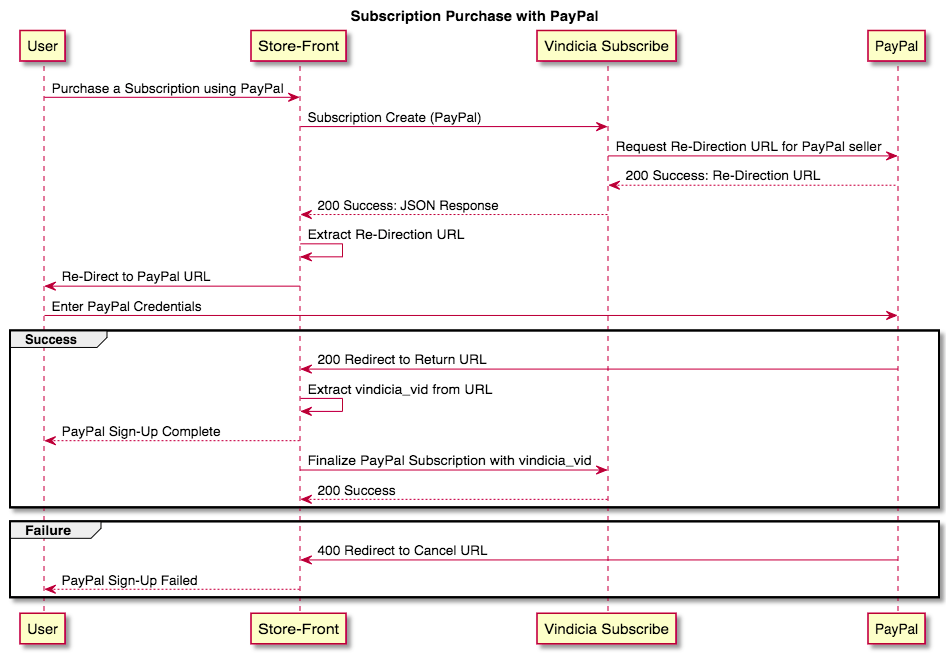
Create a Subscription with Paypal Express Checkout Payment Method Using Subscribe APIs
Establish a valid PayPal business account, authorize Vindicia to be a presenter on that account, and supply the required credentials to Vindicia. For implementation details, see Using PayPal with Vindicia Subscribe. To create a Subscription with Paypal Express Checkout as the Payment Method:-
Capture the subscription information and begin the subscription create process by calling the subscriptions endpoint with the request JSON.
For PayPal, the subscription create API call includes the PayPal payment method with the
return_url(where to redirect the user after the PayPal credentials have been successfully captured), as well as acancel_url(where to redirect the user in case of invalid PayPal credentials).Subscribe sends a redirection URL in the response to the API call. You then redirect the user using that URL to enable the user to login to PayPal and authorize the subscription. If the login is successful, Subscribe responds with the URL you provided forreturn_urland the PayPal transaction VID is returned in the URL string. If unsuccessful Subscribe responds with thecancel_url. PayPal Return URL contains thevindicia_vid:http://merchant.success.paypal.com/? **vindicia\_vid=8d3900ef6f5b899b8883576101066de4131c30d3**&vin_validate=1&token=EC-6UY81576RU8018237 -
After the PayPal credentials have been captured successfully, call the subscriptions endpoint to capture the initial PayPal transaction and set up the subscription for recurring billing.
Note:
The initial transaction VID is passed to the subscriptions endpoint with the finish action.
https://api.staging.us-west.vindicia.com/subscriptions/8d3900ef6f5b899b8883576101066de4131c30d3/actions/finishSample Code:-
POST to the subscriptions endpoint to create the PayPal subscription:
https://api.staging.us-west.vindicia.com/subscriptions?dryrun=0Request JSON Payload Sample Response JSON Payload PayPal Express Checkout Payment Method attributes -
POST to the subscriptions endpoint to capture the initial transaction and authorize recurring billing with PayPal.
https://api.staging.us-west.vindicia.com/subscriptions/8d3900ef6f5b899b8883576101066de4131c30d3/actions/finishPostman Collection
-
POST to the subscriptions endpoint to create the PayPal subscription:
- A proper Subscription with Account and Payment Method objects are created in Subscribe.
- The initial Transaction is generated if applicable, including any applicable taxation.
- Future billings are correctly predicted.
- The Account has been granted appropriate Entitlements.