- Use Case: 2-2-01
- Completed By: Software Developer
- Estimated Completion Time: <5 days
Basic Scenario
- Establish a local data cache of the product catalog (Products, Billing Plans and Campaigns).
- Create an API to enable easy access to the local cache for your storefront.
- Set a trigger mechanism or scheduled task to update the local data cache.
Design Approach
You must set up a local cache for the product catalog. The cache displays products with pricing, currency, and terms during the subscriber checkout process. To regularly update the local cache, use the Subscribe REST endpoints to get the Products, Billing Plans and Campaigns, as shown in the following diagram.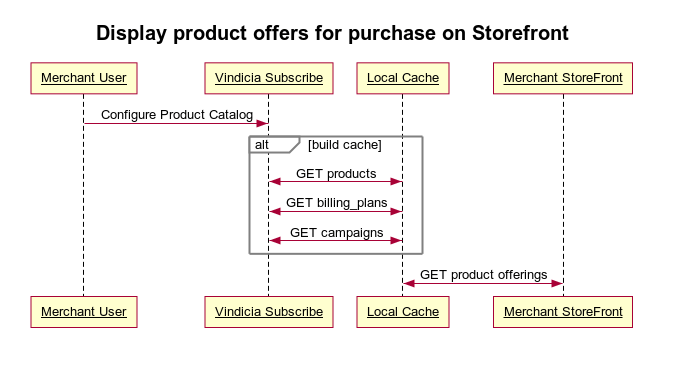
- The matrix of Products and Billing Plans is your sole responsibility as the merchant. Subscribe does not enforce associations between Products and Billing Plans.
- Even if your initial Product and Billing Plan offerings are limited, the local caching procedure allows for future expansion of offerings without impacting the subscriber checkout experience.
- Populate Your Local Data Cache Using Subscribe APIs
- Example: Implementing a Product Catalog Cache with AWS
Populate Your Local Data Cache Using Subscribe APIs
-
Create a scheduled task that calls the products endpoint to update the local cache.
Product REST endpoint (staging):
GET https://api.staging.us-west.vindicia.com/productsSample Code: Calling the products endpoint for all products Vindicia recommends that you refresh the cache at least once every 24 hours to catch any changes to the products. Set the limit to 10 to return ten results per page. -
Create a scheduled task that calls the billing_plans endpoint to update the local cache.
Billing_plans REST endpoint (staging):
GET https://api.staging.us-west.vindicia.com/billing_plansSample Code: Calling the billing_plans endpoint Vindicia recommends that you refresh the cache at least once every 24 hours to catch any changes to the billing plans. Set the limit to 10 to return ten results per page. -
Create a scheduled task that calls the campaigns endpoint and establishes a local cache.
Campaigns REST endpoint (staging):
GET https://api.staging.us-west.vindicia.com/campaignsVindicia recommends that you refresh the cache at least once every 24 hours to catch any changes to the campaigns. Set the limit to 10 to return ten results per page. Note: Increase the limit attributes if necessary to manage a higher volume of results. - Create a scheduled task to refresh the cache, or provide a mechanism to trigger a rebuild of the cache.
- Create an API to access the cache contents from your storefront.
- Enable Subscribe administrative users to update the local cache on demand when modifications to the product catalog are made.
Example: Implementing a Product Catalog Cache with AWS
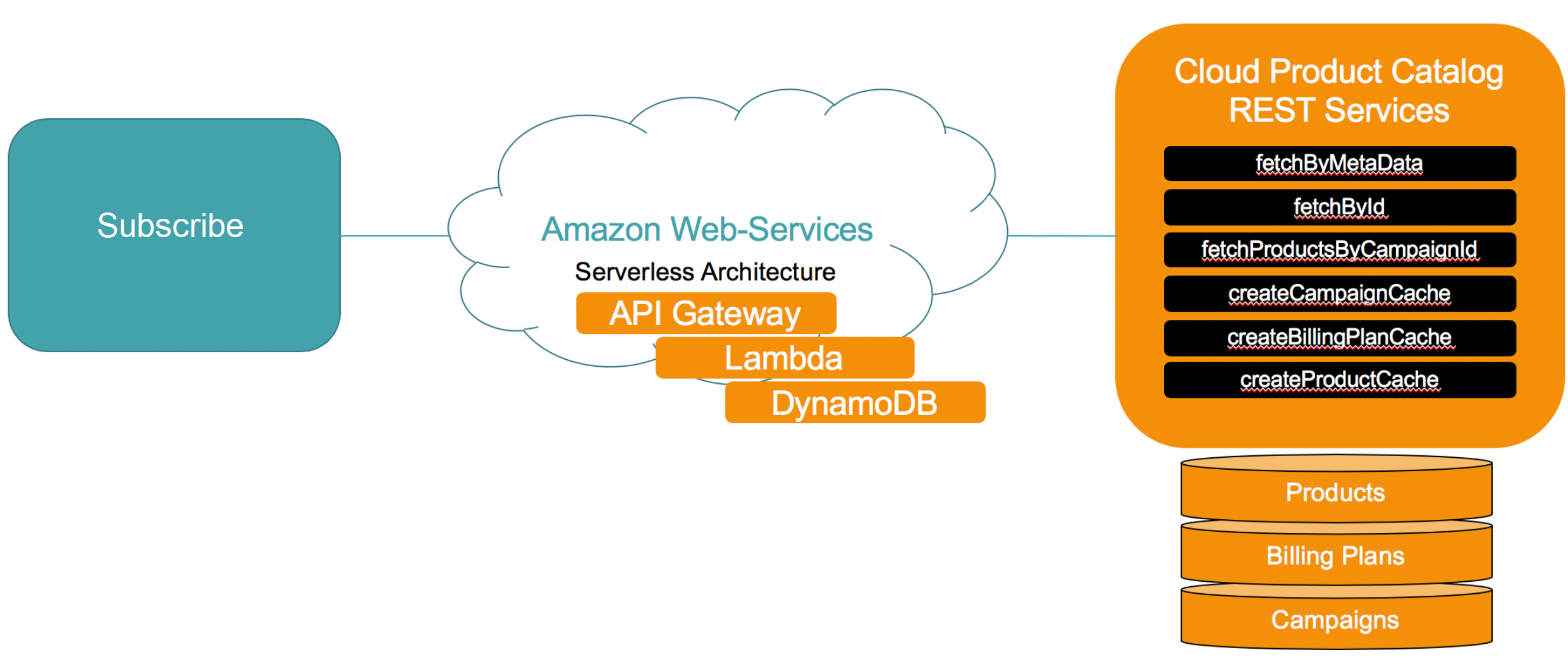
This example describes how to set up a working product cache using Amazon Web Services (AWS) and how to use REST APIs to instantiate and update the cache. REST APIs access products, billing plans and campaigns from the cache for display on your storefront. The basic scenario is as follows:- Establish a data cache of the Vindicia Subscribe product catalog in the cloud utilizing AWS technology.
- Create a scheduled task to retrieve the Products, Billing Plans and Campaigns to update the local data cache.
Design Approach
This use case requires your own merchant instance of AWS for deploying REST APIs and Python Lambda functions. The design approach is as follows:- Deploy the REST APIs on the AWS API Gateway.
- Deploy the corresponding Lambda functions using AWS Lambda to implement the logic for the REST API.
- Use the createProductCache, createBillingPlanCache, and createCampaignCache REST APIs to establish regularly updated local caches of products, billing plans and campaigns in AWS DynamoDB.
- Use the local caches to display your service offerings with pricing, currency, and terms during the customer checkout process. Using a local cache avoids the latency caused by fetching this data directly from Vindicia Subscribe during checkout.
- Use the fetchById, fetchByMetaData, fetchProductsByCampaignId REST APIs to access the product catalog cache contents.
- Enable a Vindicia Subscribe administrative user to update the local caches on demand when adding a new product, billing plan or campaign. This can be accomplished by refreshing the cache regularly. Vindicia’s best practice is to refresh the caches every 24 hours. However, AWS charges based on data throughput so it is optimal financially for you to only trigger a cache update when your product catalog has changed. Note: The matrix of products, billing plans and campaigns is your sole responsibility as the merchant. Vindicia Subscribe does not enforce associations between products and billing plans. Vindicia Subscribe does enforce which products and billing plans can be used with specific campaigns.