

Vindicia Supported Payment Providers for 3DS
Most current payment providers support 3DS authentication natively. The implementation details may differ slightly, but most follow the EMV 3D Secure Specification from EMVco. In cases where 3DS support is not natively supported by a given payment provider (for example, WorldPay and CyberSource), Vindicia leverages Cardinal Commerce (a Visa solution) specifically for providing an authentication service (for information, see cardinalcommerce.com). Vindicia works with each of our supported providers to allow our merchants to implement 3DS on the Subscribe platform. Vindicia supports the following payment providers with 3DS flows:- Barclays SmartPay
- Braintree
- Ingenico Global Collect
- Ingenico Connect
- CyberSource
- Chase Paymentech
- WorldPay
- Paysafe
- FCBarca Gateway
3DS Process Flow Changes
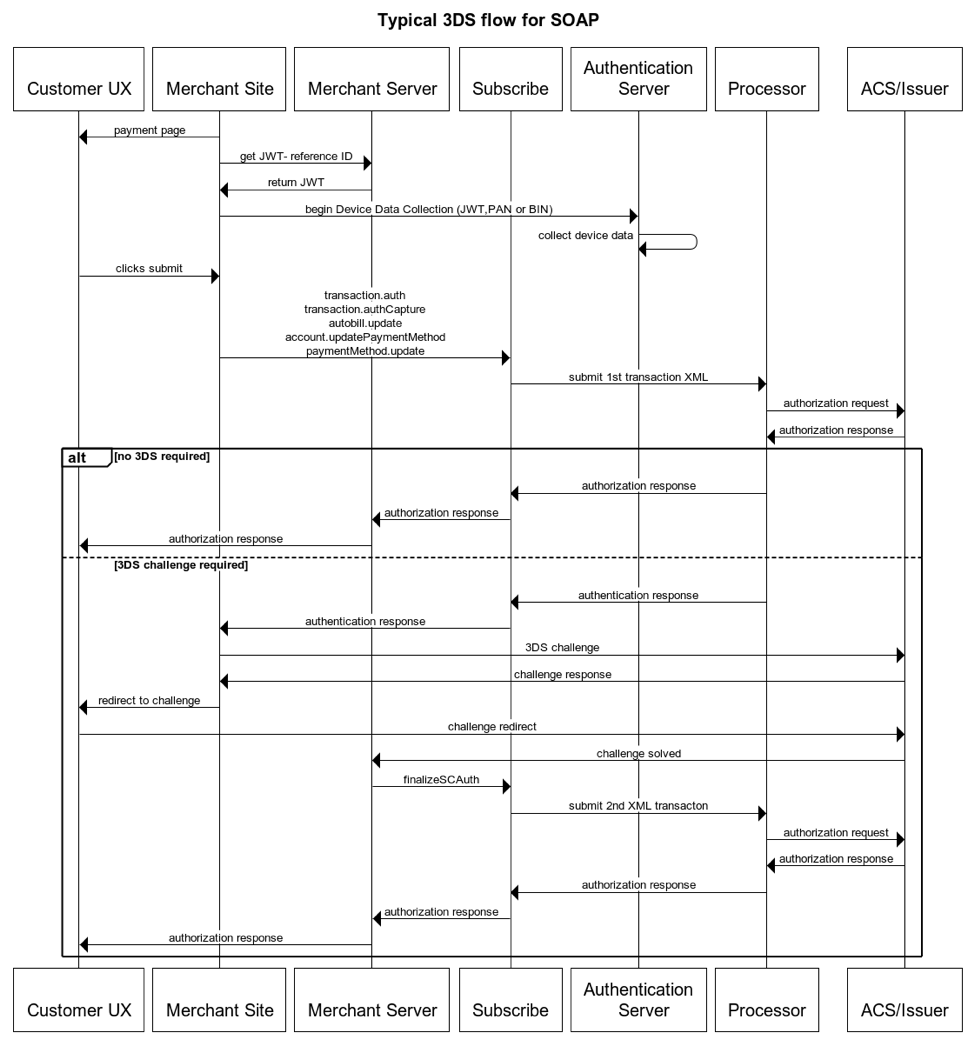
Steps You Need to Implement
To implement 3DS, you must:- Alter the commerce flow by implementing Device Data Collection in the customer’s browser (sometimes also referred to as fingerprinting). Use Vindicia’s PMT implementation for REST or HOA for SOAP.
- Query for 3DS availability for the Credit Card BIN (or Full PAN if available) used in the purchase. Not all cards are eligible for 3DS.
- Invoke the Vindicia API to create a Transaction or Subscription. These APIs have been modified to support passing new, 3DS-specific fields, including the reference to the device information that was collected in the previous BIN lookup steps.
-
Check the API response to see if the issuing bank has required a 3DS challenge for this purchase:
- If a challenge is required, the returned information includes a redirect URL from the issuing bank, and the merchant site is required to handle the redirect of the customer to authenticate their identity. Based on the result, either continue or require a different payment method for the purchase.
- If there is no challenge, the authorization proceeds as usual (generally termed a frictionless purchase).
- In the case of a 3DS challenge and successful authentication of the customer, you must call a new API method, transaction.finalizeSCAuth, in SOAP or finish Transaction in REST to continue the authorization process.