

Announcements
Subscribe OpenAPI Updated
The Subscribe OpenAPI Rest YAML, the API spec for Subscribe up to 2023.01, is available in Knowledge Center > Developer Hub. The Subscribe OpenAPI serves as a reference guide and source for API integration development. It can be downloaded from the Vindicia Knowledge Center for ease of use. This release includes the following announcements:Subscribe Features
This release includes the following new Subscribe features:Subscribe Merchant Portal 2.0 Enhancements
-
Transaction Summary by Status and Currency - With this release, the Transaction search results page displays a summary of the status and currencies for the transactions appearing on the page. This feature provides parity with the functionality available in Subscribe Portal 1.0.

-
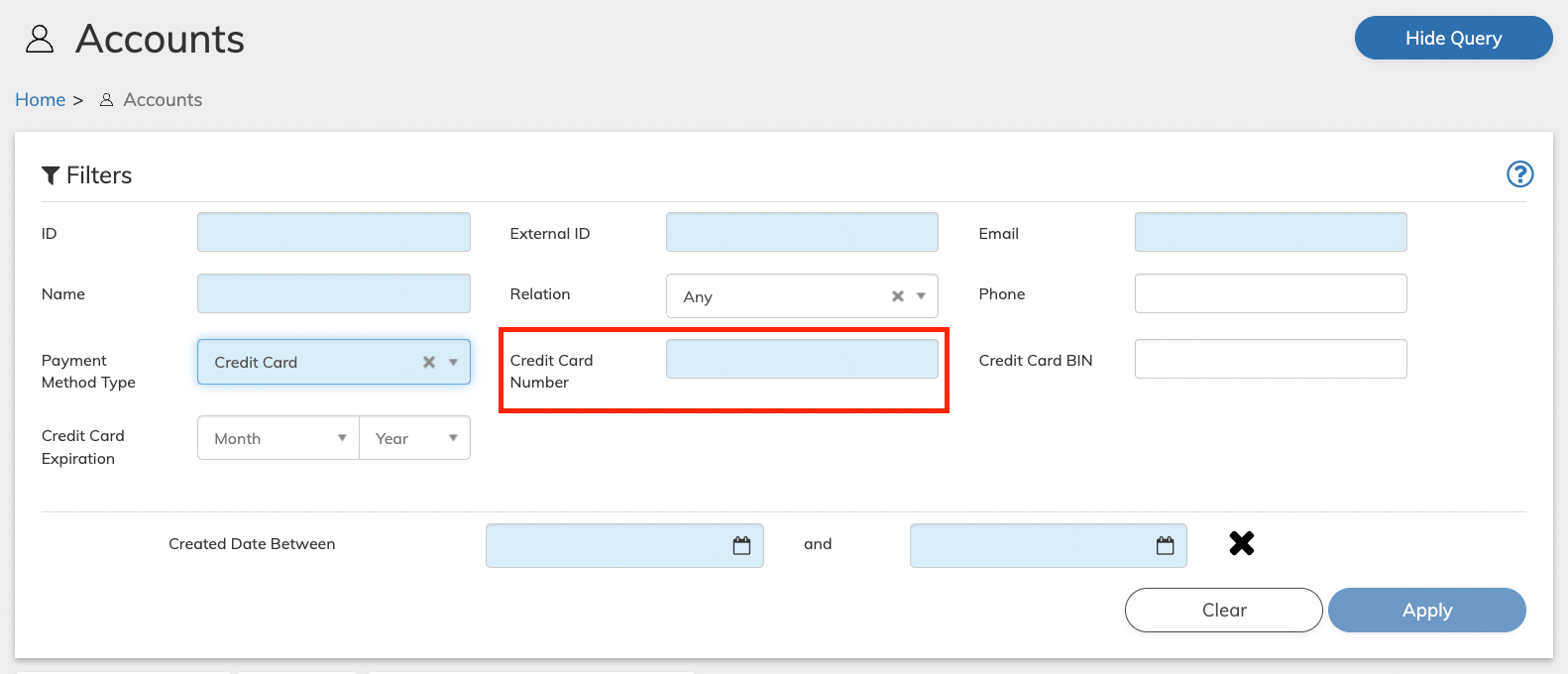
Account Search Improvements - When the Payment Method Type is Credit Card, users can now search for accounts using the following search fields:
-
Credit Card Number (Key Field - required for searching by Credit Card) - Enter one of the following:
- (Recommended) The full number of the credit card associated with the Account. Requires at least 10 digits, allows up to 16.
- The last four digits of the credit card. Enter at least six entries of the letter x and the last four digits of the card. Example for a 16 digit card: xxxxxxxxxx2214
- The first six digits (BIN) and last four digits of the card. Example for a 16 digit card: 143272xxxx2214
- Credit Card BIN - The Bank Identification number relevant for the credit card. This is typically the first 6 digits of the card. (optional field)
-
Credit Card Expiration - Enter the Month and Year until which the card is valid. (optional field)
-
Credit Card Number (Key Field - required for searching by Credit Card) - Enter one of the following:
- View Credit Cards Type - Users can now view the credit Card Type in the Accounts page Payment Method pane. (PORT-2332)
-
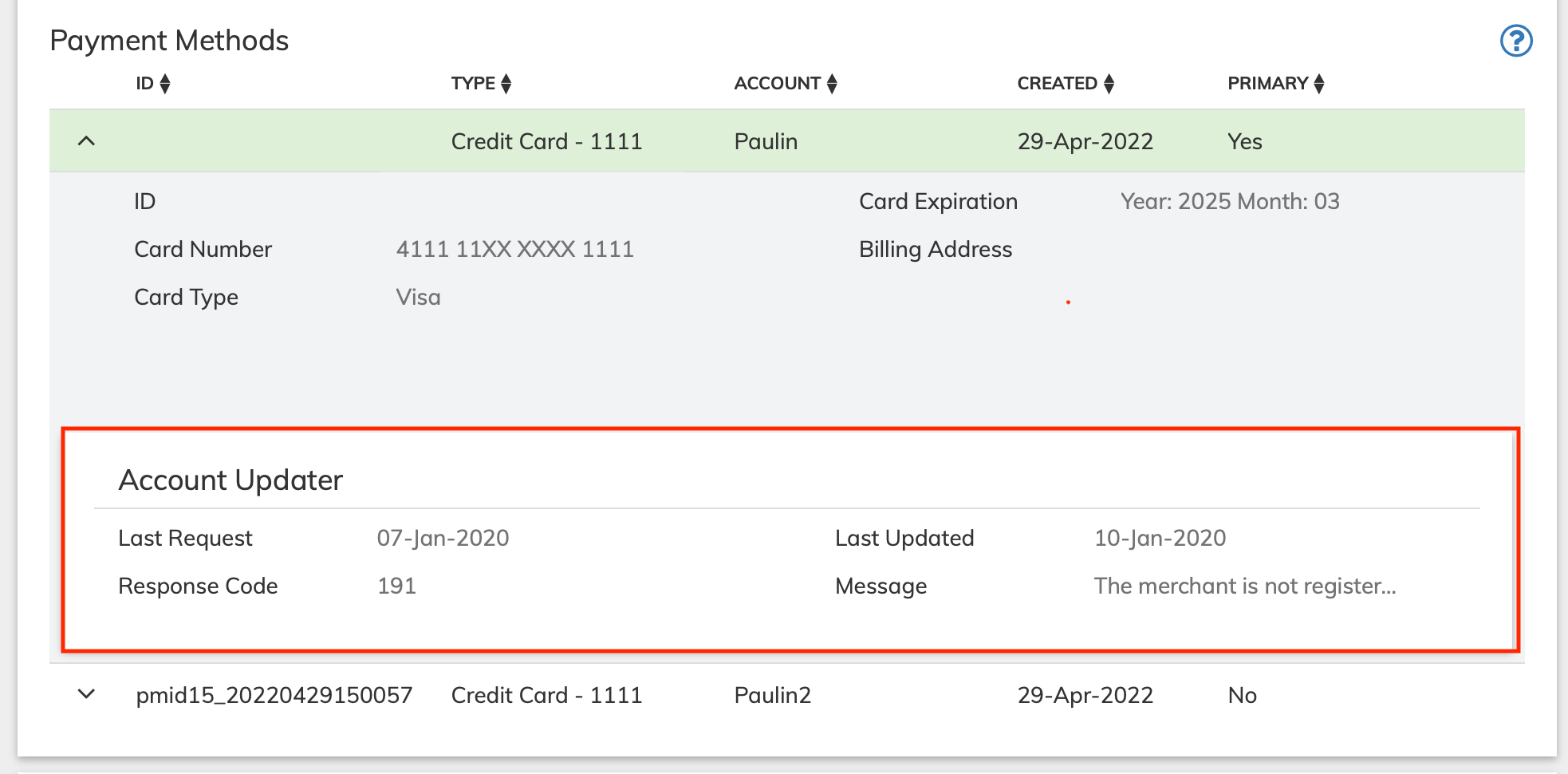
Account Updater Information for Credit Card Payment Method - With this release, when users expand the details of a credit card in the Accounts page Payment Methods pane, Account Updater information now appears. The following information can appear in the Account Updater section:
- Last Request: Date when the last request was sent to Account Updater.
- Last Updated: Date when the credit card was updated by Account Updater.
- Response Code: Account Updater response code for the credit card.
- Message: Message from Account Updater. When Account Updater information is not available, No Account Updater Activity for this Card message appears.
- Usability Improvements for guidance window in Subscribe Merchant Portal 2.0 - With this release, users can move the guidance window within Subscribe Merchant Portal 2.0. (PORT-2476)
- Prevent the Removal of Payment Methods in use by a Subscription - With this release, any Payment Methods that are used by a subscription can’t be removed through the Subscribe Merchant Portal 2.0. This feature provides parity with the functionality available in Subscribe Portal 1.0. (PORT-2520)
Report and Intelligence Dashboard Features
Filter Active Subscription Detail Report by Product (SKU)
With this release, the Active Subscription Detail report can be filtered by Product (SKU) for Reports 2.0. To implement this new feature, a Products field has been added to the Create Report Active Subscription Detail window. Multiple Products can be selected and are included in the report. For more information, see Active Subscription Detail.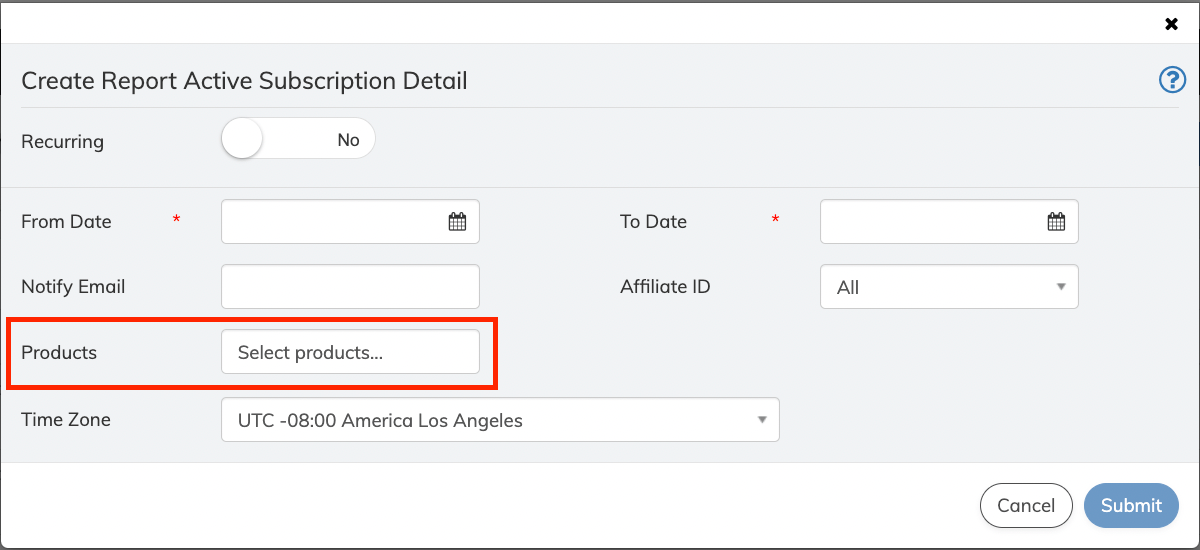
Performance Reports - Affiliate and Sub-Affiliate Columns Added
With this release, the Affiliate and Sub-Affiliate columns now appear in the following reports: These new columns display the Affiliate ID or Sub-Affiliate ID value entered for each Subscription. If a Subscription does not contain an Affiliate ID or Sub-Affiliate ID value, the column will appear as blank for that Subscription. (CAT-130)Payment Features
This release includes the following new Payment features:Braintree Integration - 3DS Support for Credit Cards
Starting from this release, Vindicia supports 3D Secure Authentication for the Braintree payment provider. For more details on 3DS, see What you need to know about 3DS. (VIN-16749)Windcave Integration - Credit Card Support
Starting from this release, Vindicia integrates with Windcave payment provider. Windcave operates in many countries and supports different currencies. For details, see the Windcave list. The integration supports credit cards, debit cards, and tokenized credit card transactions payment methods for the following main areas:- Recurring & One time transactions (including void and refund)
- Card-on-File - CIT/MIT Indicators
- Retain support - Full auth and capture (level one)
Stripe Integration - Payment Intent API Support in Subscribe
In the Subscribe 2022.11 release, Vindicia established an additional integration with Stripe by supporting Stripe’s latest Payment Intent API for Vindicia Retain. With this release, Vindicia supports the Payment Intent API in Subscribe. The integration will support credit cards, debit cards, and tokenized credit cards in US Dollars for the following main areas:- Card Verification
- Real-time Authorization
- Capture Payment
- One time Payment
- Non-Free Trial Payment
- Recurring Payment
- Void Payment
- Refund Payment
- Card-on-File - CIT/MIT Indicators
- Chargeback webhook support
- Retain support - Full auth and capture (level one), using Tokens
FirstData FDMS Compass Integration - Card on File Support
From this release, Subscribe supports the Card-on-File mandate through FDMS Compass. For more details, see Card-On-File Regulations. (VIN-17186)Bug Fixes
The following issues were solved in this release:Known Issues
This release has the following known issues.- In Subscribe Merchant Portal 2.0, when applying a discount to an existing Subscription, the campaign code field per Subscription Item displays an error. As a workaround, use the subscription level Campaign Code field instead to apply the discount. All applicable Products and Billing Plans in the Subscription will be discounted. For more details, see FAQ in the Subscribe Portal User Guide. (VIN-16925)