

Announcements
This release does not include new announcements.Subscribe features
This release includes the following new Subscribe features:Subscribe Merchant Portal 2.0 Enhancements
Based on user feedback and usage, the following feature changes were made to improve usability of Subscribe Merchant Portal 2.0:-
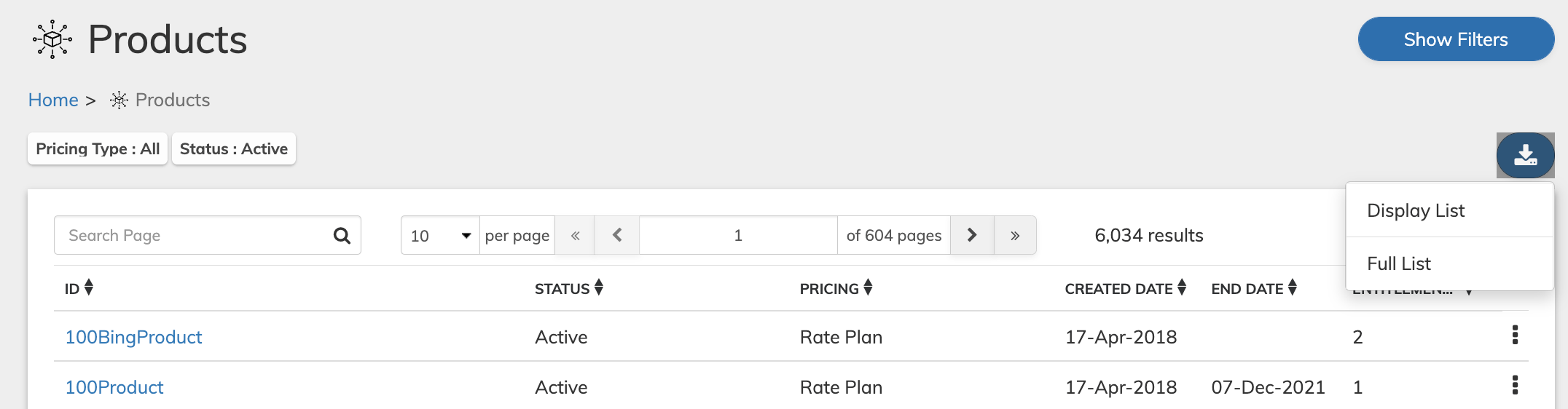
Export Search Results for the Catalog menu entities. The merchant user can download the full results list or a partial one to be stored for later use.The list downloads as a csv file and can be viewed in a program such as Notepad or Excel.
This enhancement allows users to export search results for:
- Products
- Billing Plans
- Rate Plans
- Campaigns
- Season Sets
- Tokens
- Cancel Reasons (Reason Codes)
-
Updates to Campaign Coupon Codes - coupon campaigns, which allow generation of multiple coupon codes, were enhanced as follows:
-
For improved user understanding, the code generation Action panel buttons were renamed as follows:
- Retrieve Codes was renamed Download Codes.
- Regenerate Codes was renamed Replace Codes.
- Mark Codes Used was renamed Cancel Codes.
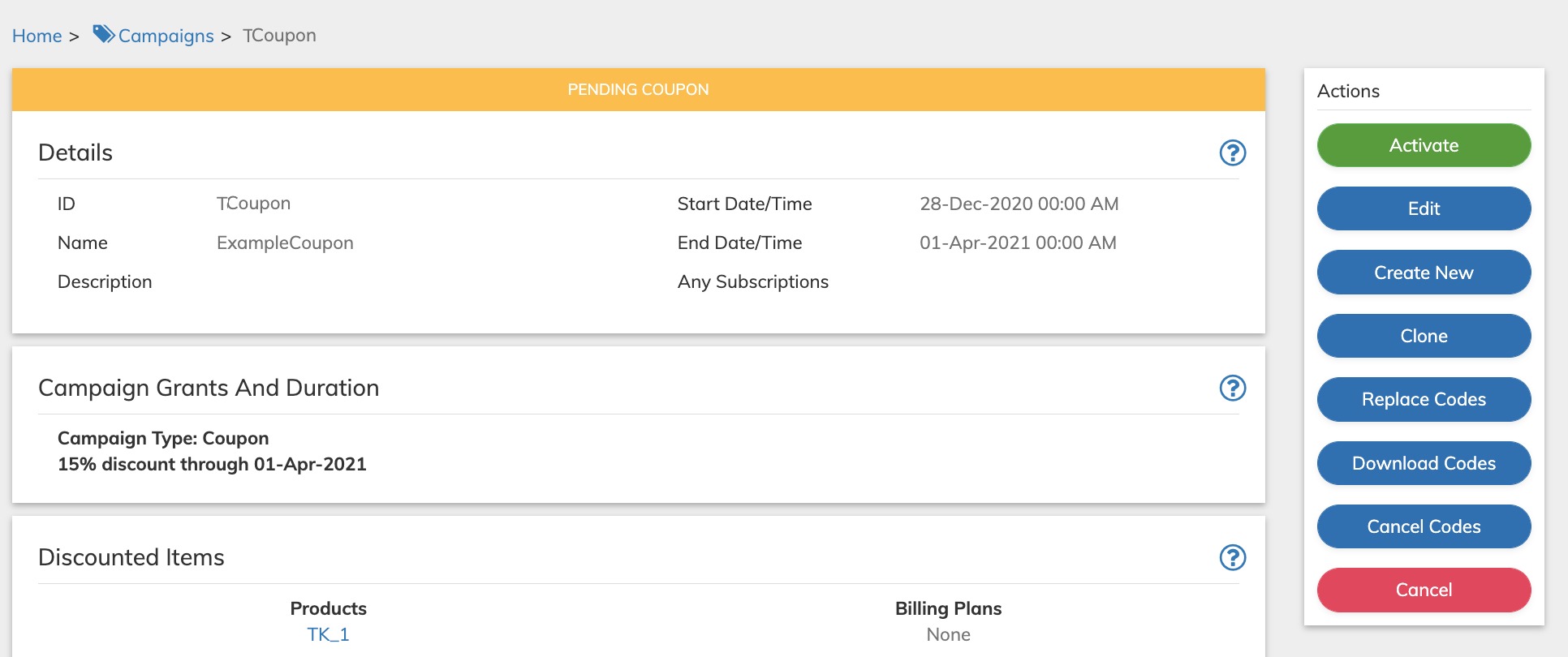
- Active Coupon Campaigns provides the option to generate additional codes by default. The On Demand Codes Allowed toggle on the Details pane was removed from the Campaign page.
- The Coupon Codes pane was enhanced to also display the optional Separator field when viewing a coupon campaign.
-
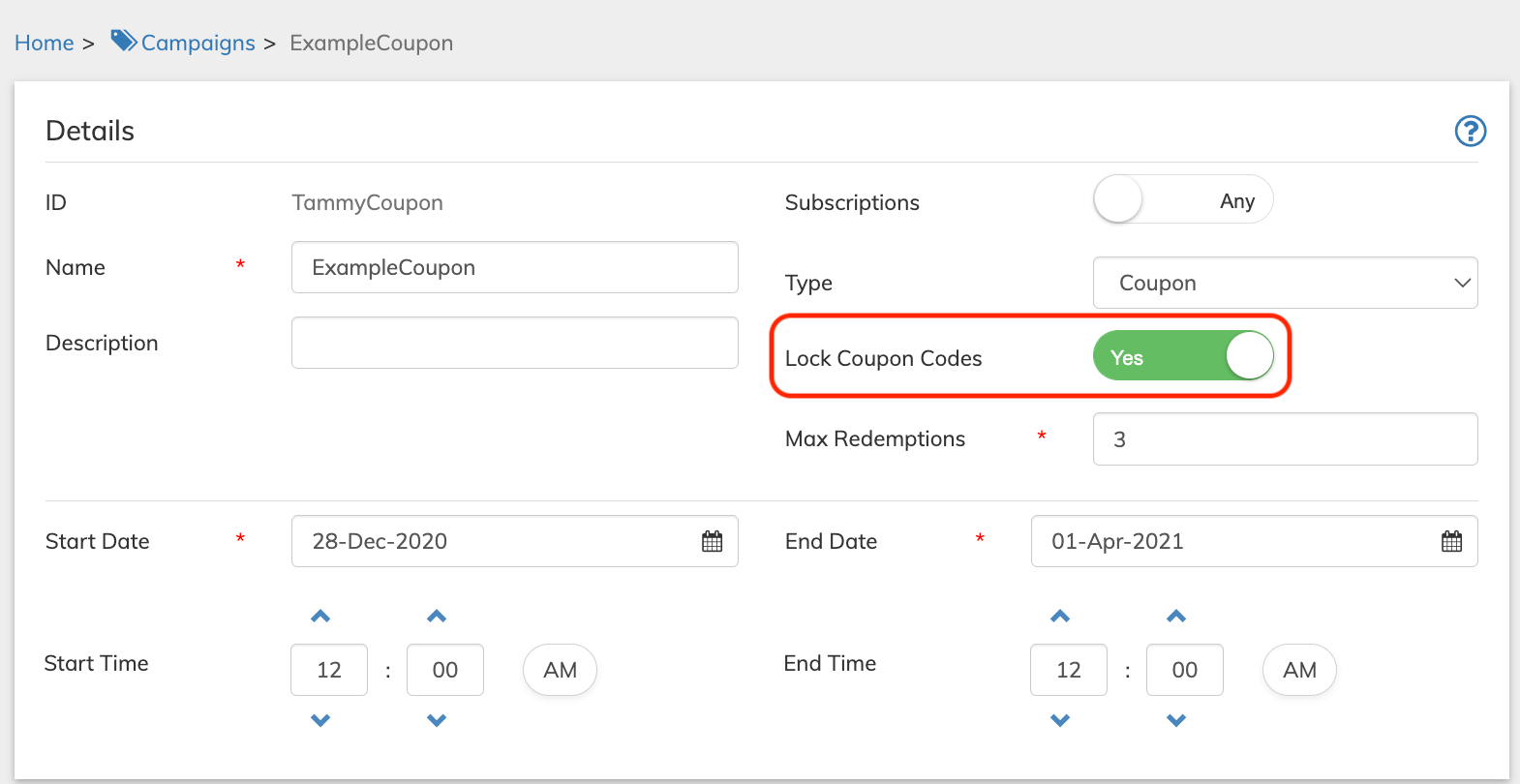
For improved user understanding, the Requires Activation toggle on the Details pane for coupon campaigns has been renamed Lock Coupon Codes. The toggle defines whether the coupon codes require locking them as an additional security measure and then unlocking them (activating) prior to them being available for use. This name change also appears on the Coupon Codes pane when viewing a coupon campaign.
-
For improved user understanding, the code generation Action panel buttons were renamed as follows:
Reason Codes Consolidation
From this release, Subscribe allows you to define pause subscription Reason Codes through the Portal. Previously cancel reasons were available in the portal in order to specify a reason for canceling a subscription. The pause and cancel reasons have been consolidated in the Subscribe Merchant Portal and renamed Reason Codes. When adding a new reason code, you can define the Reason Type, as either Pause or Cancel. When viewing the Reason Codes page in the Subscribe Merchant Portal, you can filter results by Reason Type. A new Reason Codes endpoint has been added to Subscribe Rest API Tip: For more details, see Subscribe Merchant Portal User Guide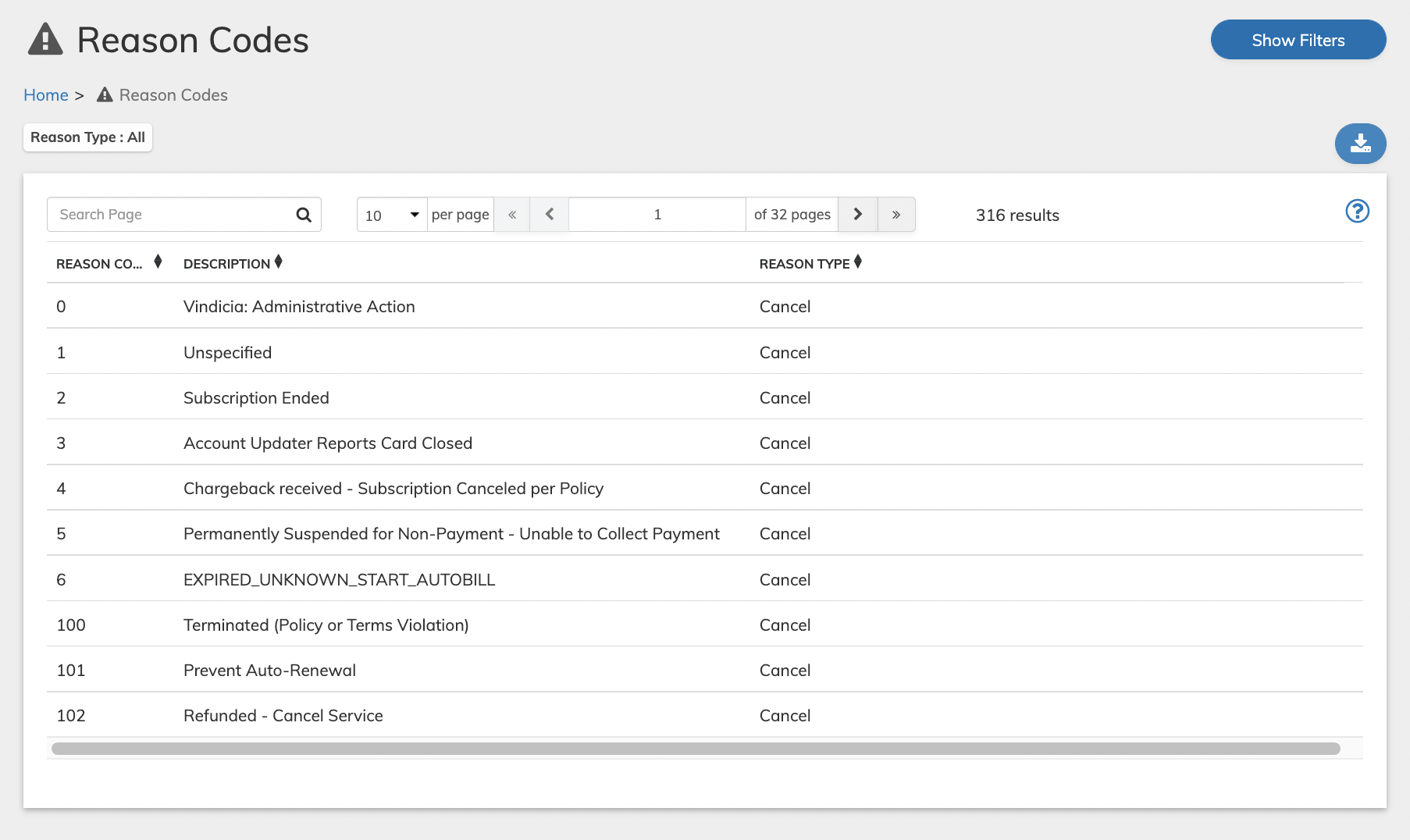
External User Authentication - OIDC Connector Support
In this release, Subscribe has released its generic OIDC Connector that allows integration with any external identity provider that follows the OIDC protocol. Note: Merchants that want to utilize this capability, please contact Vindicia Client Technical Support. (VIN-16516)Payments Features
This release includes the following new Payment features:Ingenico Connect Integration - Support for Tokenized Credit Cards for Subscribe and Retain
In Subscribe 2022.05 release, Vindicia provided an integration with Ingenico Connect Payment provider. In this release, Vindicia is expanding its support for the Ingenico Connect integration to also include token support for credit cards in both Subscribe and Retain. Tokens provided as part of Vindicia Retain APIpaymentMethodId will be supported. The paymentMethodIsTokenized attribute in the payment method object should be set to true (1).
Note: This is a new integration with Ingenico Connect. It is currently provided in addition to Vindicia’s Ingenico Global Collect Integration. Ingenico Global Collect are planning to deprecate the Global Collect API in the future and merchants will be required to move to the Ingenico Connect interface.
(BIMS-596)
Juspay for checkout.com Integration - Support for Tokenized Credit Cards for Retain
In this release, the Juspay for checkout.com integration is being enhanced to accept credit card tokens in both Subscribe and Retain. Tokens provided as part of Vindicia Retain APIpaymentMethodId will be supported. The paymentMethodIsTokenized attribute in the payment method object should be set to true (1).
(VIN-17392)
MarketPay Truust Payment Integration
Starting this release, Vindicia is integrated with MarketPay Truust Payment Provider (MarketPay Truust 2.0). The integration supports Euro Transactions only for the following main areas:- Recurring and One time transactions (including refund)
- Minimal authorizations
- Supported payment methods: Hosted Pages supporting credit cards
Stripe Integration - Enhancement of the Authorization Responses for Failed Transactions Data
Previously, Vindicia returned high-level authorization response codes for failed transactions received from Stripe. In this release, the detailed response has been included, to better apply our retry logic. (VIN-16602)Ingenico Global Collect Integration - Reversal of Collected Direct Debit Payment in Daily Reporting
Previously, if a Global Collect Direct Debit transaction was reversed at the bank by the customer, the transaction remained recorded as captured in Subscribe. From this release, a Direct Debit transaction that is reversed at the bank by the customer is marked as Refunded or Canceled in Subscribe. (VIN-16675)Retain Features
This release includes the following new Retain features:Retain Portal and Merchant-Specific Retain Dashboards
In this release new Retain Dashboards, providing valuable Merchant-Specific information, will be available in the new Retain Merchant Portal. Watch the video for the new capabilities offered. Retain Dashboards provide crucial data and analytics of your failed Transactions and uncover insights how these failed Transactions were healed and captured. They show actionable trends and provide the conversion business data of failed Transactions as well show the implication of the lost revenue recovery and customer retention to your business over time. Note: To get access to the new Portal please contact Vindicia Client Technical Support.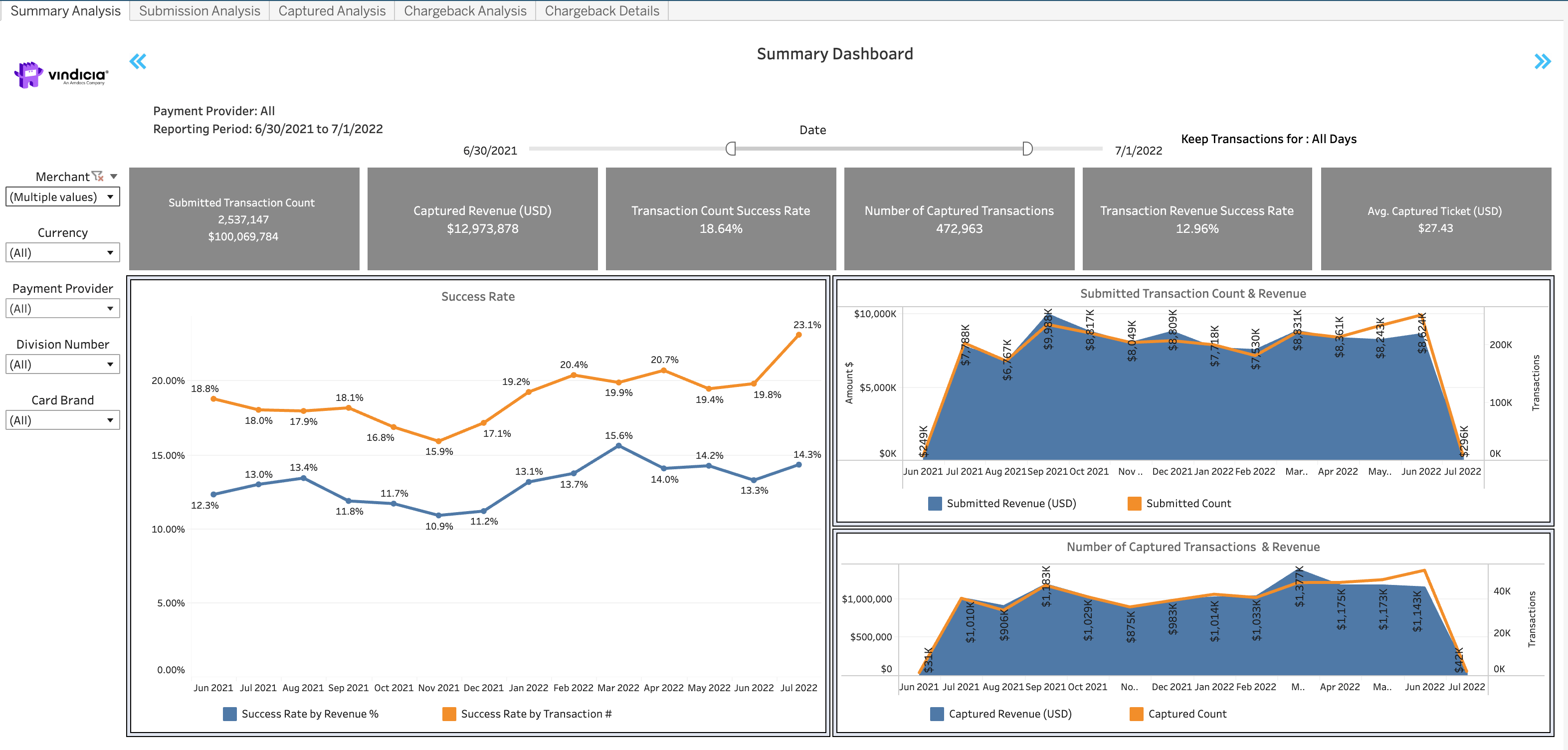
Bug Fixes
The following issues were solved in this release:Known Issues
This release has the following known issues.- In Subscribe Merchant Portal 2.0, when applying a discount to an existing Subscription, the campaign code field per Subscription Item displays an error. As a workaround, use the subscription level Campaign Code field instead to apply the discount. All applicable Products and Billing Plans in the Subscription will be discounted. For more details, see FAQ in the Subscribe Portal User Guide. (VIN-16925)
- In Subscribe Merchant Portal 2.0, the Transaction search by partial credit card (either last four digits of the credit card or first six digits (BIN) and last four digits of the card) is timing out. As a workaround, enter additional details iin the Transaction search to receive the search results. (VIN-17967)