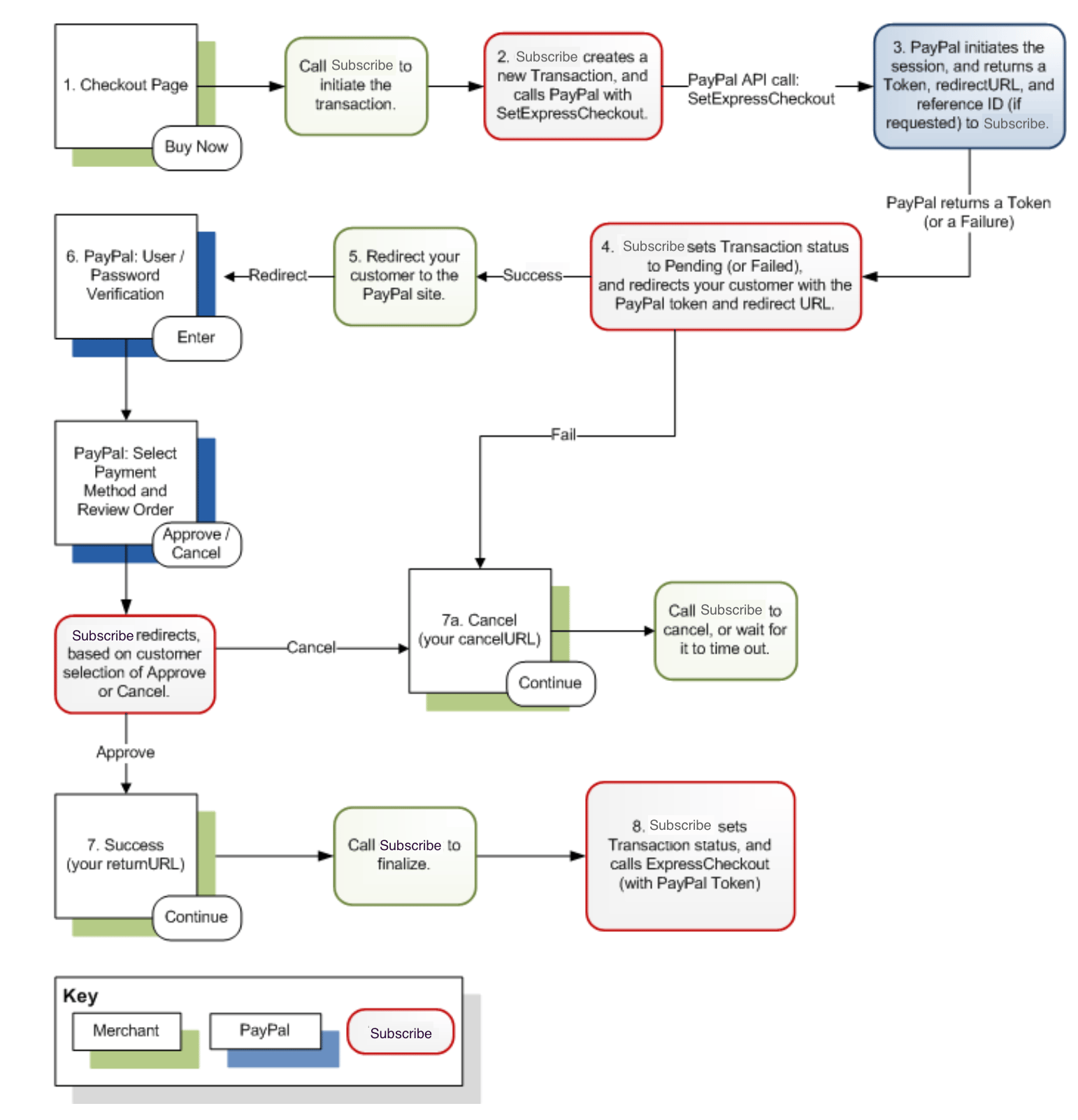
- When your customer selects PayPal as their Payment Method, call Subscribe to initiate the transaction, passing Subscribe all relevant purchase information. Initializing the process creates a Transaction, sets its status to AuthorizationPending, and begins the Checkout process with PayPal.
-
Subscribe creates a new Transaction, and calls PayPal (uses the behind-the-scenes PayPal API
SetExpressCheckout). - PayPal initiates the session, and returns a token, the PayPal redirect URL, and a reference ID (if requested) to Subscribe. Note: Request a reference ID from PayPal only for use in recurring Subscriptions. The reference ID is not used for One-Time Transactions.
-
Subscribe then sets the Transaction status to Pending (or Failed), and redirects your customer to you with the PayPal token and redirect URL. (If PayPal returned a Failure, Subscribe redirects your customer to your specified cancel URL.)
- On success, PayPal returns a unique session identifier, or “token,” and a redirect URL to Subscribe, and Subscribe passes that information back to the merchant for processing.
- On failure, PayPal returns a failure reason code to Subscribe, and Subscribe passes that information to you in a TransactionStatusPayPal object for processing.
-
Redirect your customer to the PayPal site, using the PayPal redirect URL returned from Subscribe.
- “In context” PayPal flow is not supported yet. Subscribe currently offers the standard “redirect” flow.
-
On the PayPal redirect URL, your customer logs in to PayPal (usually enters their username and password, and clicks Continue, but methods like PayPal’s One-Touch can be used). PayPal authenticates the user, and redirects them to the Payment Method selection page. Your customer selects their payment method, reviews the order, and clicks Approve (or Cancel).
- Invisibly to the customer, the PayPal site momentarily redirects to Subscribe.
- With a successfully completed PayPal transaction process, Subscribe redirects the customer to the merchant’s success URL.
- On a failed or cancelled PayPal transaction process, Subscribe redirects the customer to the merchant’s cancel URL.
- From your Success page, call Subscribe to finalize the transaction. OR From your Cancel page, call Subscribe to cancel the transaction.
- Subscribe sets the Transaction Status to Authorized, queues it for batch capture (and behind-the-scenes calls PayPal API ExpressCheckout with the PayPal Token to complete the process).