- A merchant sends a transaction to Subscribe to perform an internal validity check to ensure Account and Payment Method information meets internal consistency check, and optionally calls the ChargeGuard Fraud Screen to determine chargeback probability.
- If the transaction passes the validity check (and is within fraud screen threshold if chargeback probability is calculated), then the transaction is either sent for processing, or the merchant application performs additional work before explicitly submitting the transaction for processing.
- If the transaction fails the validity test, a failure reason code is returned. If chargeback probability is calculated, a fraud screen score is also returned.
- Subscribe submits the transaction to the payment processor and can perform either an Auth/Capture or an Auth that may then be followed by an explicit Capture if more work is needed (for example, ensuring that a tangible good is shipped before capturing the transaction).
- Once the transaction is Captured, a One-Time Inbound Success notification can be sent to the customer and the merchant application sets the customer entitlement.
- If a transaction is refunded, Subscribe can send a Refund notification.
- Subscribe can send a Pre-Bill, End of Trial, or Expiration notification.
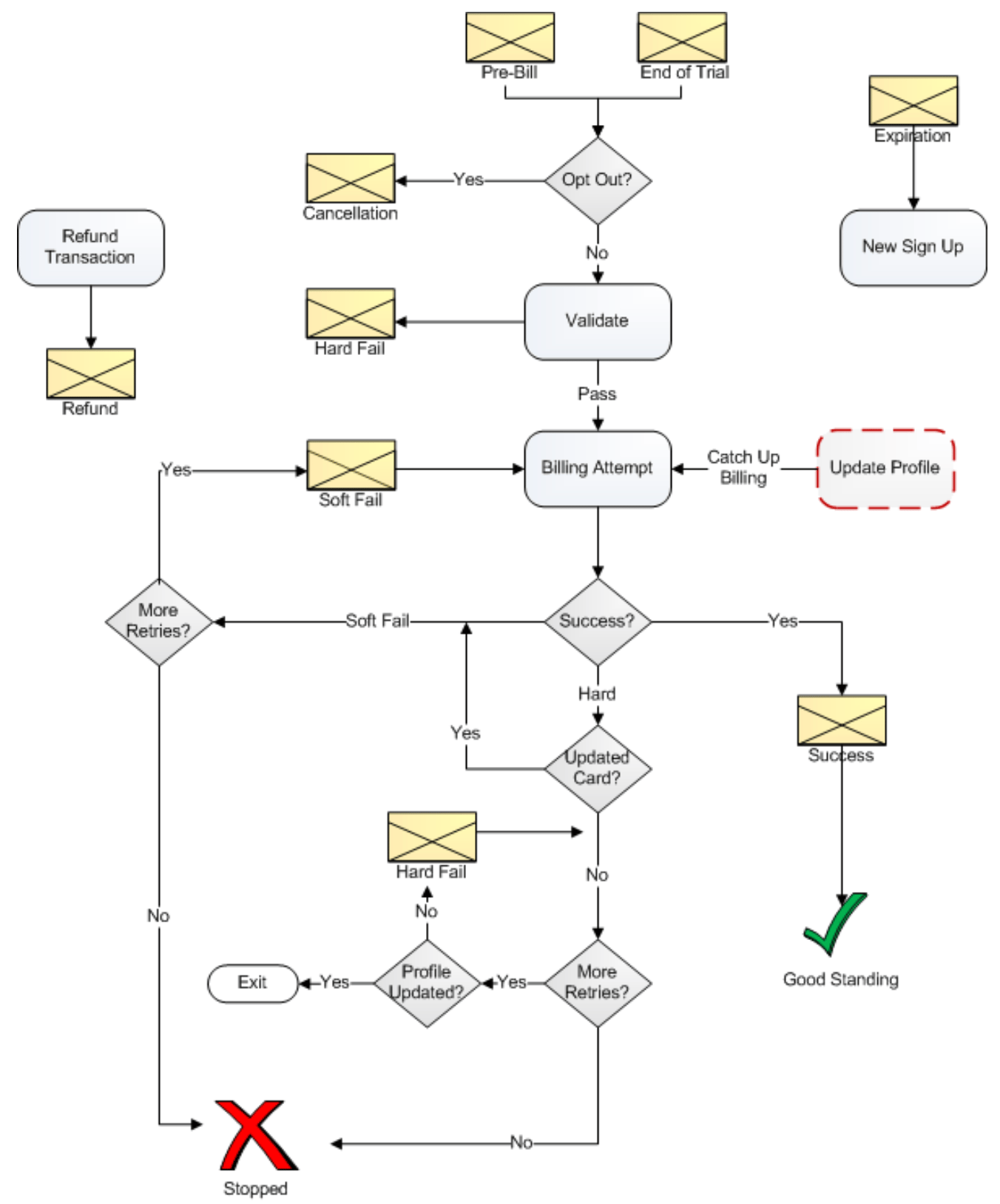
- Subscribe performs an internal validity check to ensure Account and Payment Method information meets an internal consistency check.
- If the transaction passes the validity check, processing continues.
- If the transaction fails, then Subscribe can send a Hard Failure notification.
- If the customer opts out of the subscription via the merchant’s customer self-service portal after a Pre-Bill notification has been sent, then Subscribe can send a Cancellation notification.
- The merchant defines how many times/days before subscription expiration that billing should be attempted. For as long as a customer does not opt out of a subscription, Subscribe continues to submit a billing transaction to the payment processor.
- If the transaction Authorization/Capture is successful (determined by the reason code returned from the payment processor), Subscribe can send a Success notification.
- If the payment processor returns a reason code that indicates a failure (for example, a Hard Fail if the card is longer valid or the account is closed, or Soft Fail if there are insufficient funds) Subscribe makes another attempt to process the transaction.
- If the merchant has enabled Card Account Updater with the payment processor, and the response resulted in Hard Fail, Subscribe sends a request for an updated card to the payment processor.
- If the payment processor returns an updated card Subscribe changes the transaction status to Soft Fail. All Soft Fails are resubmitted to the payment processor according to the retry schedule defined by the merchant, and in the meantime Subscribe can send a Soft Fail notification if the merchant has defined one.
- A transactions that results in a Hard Fail is not resubmitted to the payment processor, but Hard Fail notification messages can be sent according to the retry schedule defined by the merchant.
- If a customer updates a Payment Method, a custom merchant application can make a Catch Up Billing call to perform another billing attempt. If successfully captured, Subscribe can send a Success notification.
- If a transaction is refunded, Subscribe can send a Refund notification.