> ## Documentation Index
> Fetch the complete documentation index at: https://docs.slm.m1amdocs.com/llms.txt
> Use this file to discover all available pages before exploring further.
# Vindicia IDP Release Announcement
At the core of its platform, Vindicia's products are built to safeguard your financial data, keeping you secure and compliant. We understand that privacy, integrity, and availability of your data is vital to your business.
Vindicia is pleased to announce the launch of **Vindicia IDP**, its advanced Identity Provider experience for user authentication and login to Vindicia's Merchant Portals. Vindicia IDP is available for Subscribe and Retain merchants at no additional cost starting from April 1, 2023.
Vindicia's IDP supports all PCI- and ISO- required security measures such as complex passwords, Multi-Factor Authentication, and the use of unique passwords. It provides an additional security layer for Vindicia portals, helping to protect against unauthorized access. Merchant users will be responsible for creating their own passwords in a simple-to-use Identity Provider app.
**Note:** API access is not impacted and will not change with the Vindicia IDP launch.
Additionally, Vindicia IDP will provide admins User Management capabilities for the merchant users, such as disabling and enabling users, resetting passwords, and resetting multi-factor authentication factors. These were previously unavailable for Merchant staff. The creation of new users will still require a ticket submission to Vindicia Client Technical Support.
| | Current Portal Access | New - Vindicia IDP Portal Access |
| - | - | - |
| Set your own complex password | |  |
| Multi-Factor Authentication | | |
| Merchant Admin manages users | | |
| PCI compliance | | |
| Role-based access | | |
| See the simple-to-follow flow: | | |
|
| Multi-Factor Authentication | | |
| Merchant Admin manages users | | |
| PCI compliance | | |
| Role-based access | | |
| See the simple-to-follow flow: | | |
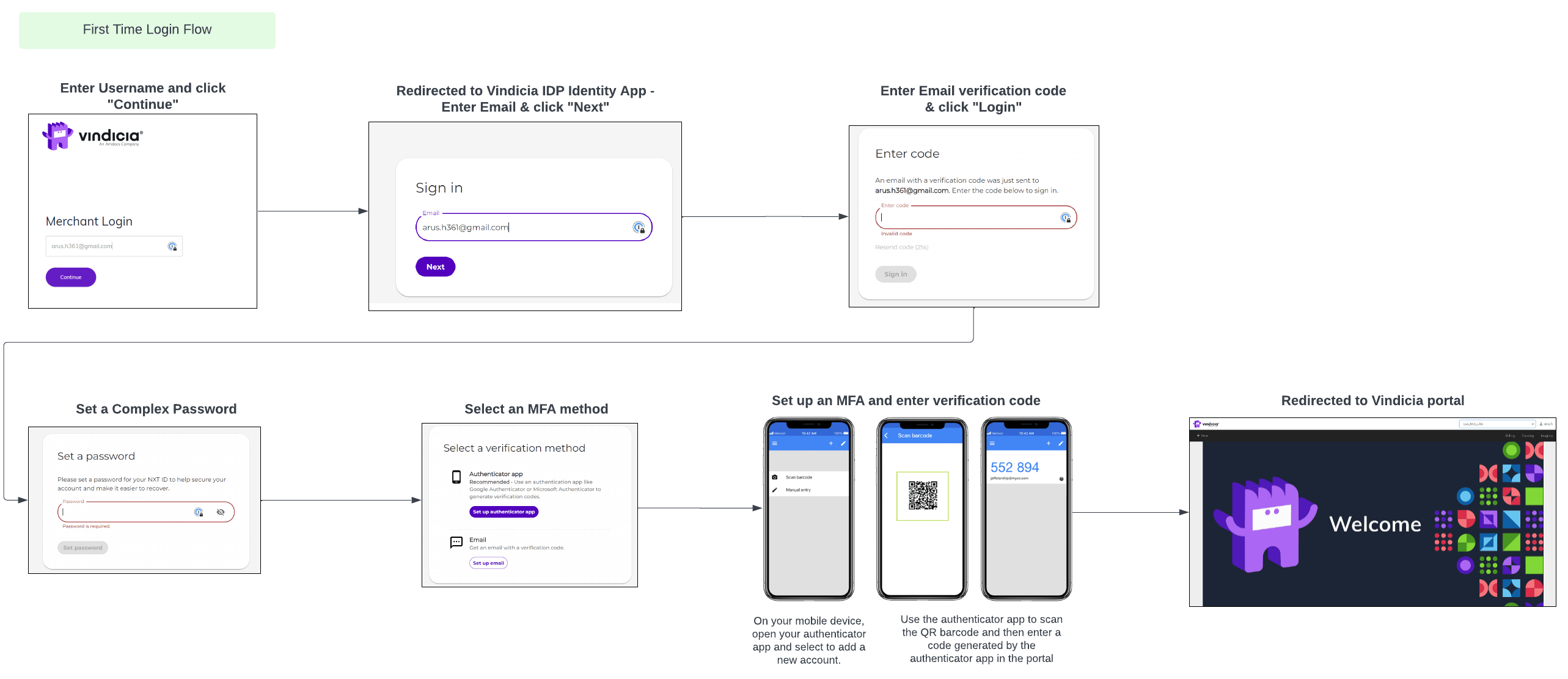 Follow all the login steps from our Portal documents: [Retain Portal User Guide](https://docs.vindicia.com/bundle/b_retainPortalUserGuide/page/topics/portalAccessingVindiciaIDP.html) or [Subscribe Portal User Guide](https://docs.vindicia.com/bundle/Subscribe_Portal2_User_Guide/page/topics/portalAccessingVindiciaIDP.html)
## Why does Vindicia require using Vindicia IDP?
The global security threat landscape is constantly evolving, and the types of attacks that can cripple a business and exploit consumers' data are on the rise. Today it’s more important than ever to implement stronger security measures. **Multi-Factor Authentication (MFA)** is one of the easiest, most effective tools for enhancing login security, and safeguarding your business and your data against security threats. As part of Vindicia's compliance with PCI and other strict security protocols, Multi-Factor Authentication is required
Vindicia IDP provides **Multi-Factor Authentication (MFA)**, a secure authentication method requiring identity verification by supplying two or more identifying details (also called factors) when a user logs in. The first factor is often a common detail (factor) such as username and password - something the user knows. Additional factors are often verification methods that the user has in their possession. For Vindicia IDP, that would be a one-time code sent to your email or an Authenticator App.
If you choose to use verification by authenticator app, most authentication Apps are supported. You can use a common one such as MS Authenticator or Google Authenticator. Download the app from your mobile device app store such as Google Play or Apple App store.
## Is Vindicia requiring merchants to enable MFA?
Starting April 1, 2023, Vindicia merchants are required to use MFA to access Vindicia Merchant Portals to protect their sensitive financial data.
Existing merchants will be moved over to Vindicia IDP in a phased approach between April and June 2023. After the migration, all the merchant's users will use Vindicia IDP to log in to Vindicia Merchant Portals.
## How can Merchant Admin manage merchant users?
Once Vindicia IDP is active for your Merchant instance, your merchant admin will be able to manage your users using a new Vindicia IDP Care console. Your merchant admin can perform User Management actions such as disabling and enabling users, resetting passwords, and resetting multi-factor authentication factors. This is new functionality, previously **unavailable** for Merchant staff.
To learn more about managing your Merchant users, see [Vindicia IDP Care Console Guide](https://docs.vindicia.com/bundle/b_vindiciaCareIDP/page/topics/careIntroduction_c.html).
**Note:** **The creation of new users will still require a ticket submission to Vindicia Client Technical Support.**
## What action can I take now?
**Get Ready**
* Vindicia team will reach out to you regarding the planned schedule via email communication
* Notify all your Vindicia users that this change is coming
* Change your internal process and internal documentation so that your administrators understand their expanded role in user management, such as when resetting passwords. See [Retain Portal User Guide](https://docs.vindicia.com/bundle/b_retainPortalUserGuide/page/topics/portalUserManagement_r.html) or [Subscribe Portal User Guide](https://docs.vindicia.com/bundle/Subscribe_Portal2_User_Guide/page/topics/portalUserManagement_r.html).
**Rollout**
* A reminder email will be sent prior to Vindicia IDP launch.
* Your users will have to log in to the Vindicia Merchant Portal and set up credentials and MFA as per the instructions provided.
## How to get help?
For questions and more information, contact - [support@vindicia.com](mailto:support@vindicia.com)
## Where can I get more information?
We’re committed to helping you succeed with your Vindicia IDP implementation, and we’ve created extensive resources to assist you in this process.
To prepare, check out:
* [FAQs for Vindicia IDP](https://docs.vindicia.com/bundle/b_retainPortalUserGuide/page/topics/FAQRetain.html)
* [Vindicia IDP User Management Care Console](https://docs.vindicia.com/bundle/b_vindiciaCareIDP/page/topics/careIntroduction_c.html)
* [Log in to Subscribe Merchant Portal](https://docs.vindicia.com/bundle/Subscribe_Portal2_User_Guide/page/topics/portalAccessingVindiciaIDP.html)
* [Log in to Retain Merchant Portal](https://docs.vindicia.com/bundle/b_retainPortalUserGuide/page/topics/portalAccessingVindiciaIDP.html)
* [User Sign In - Change Password](https://docs.vindicia.com/bundle/Subscribe_Portal2_User_Guide/page/topics/vindiciaIDPSignInCred.html)
This documentation is built and hosted on [Mintlify](https://mintlify.com), a developer documentation platform.
Follow all the login steps from our Portal documents: [Retain Portal User Guide](https://docs.vindicia.com/bundle/b_retainPortalUserGuide/page/topics/portalAccessingVindiciaIDP.html) or [Subscribe Portal User Guide](https://docs.vindicia.com/bundle/Subscribe_Portal2_User_Guide/page/topics/portalAccessingVindiciaIDP.html)
## Why does Vindicia require using Vindicia IDP?
The global security threat landscape is constantly evolving, and the types of attacks that can cripple a business and exploit consumers' data are on the rise. Today it’s more important than ever to implement stronger security measures. **Multi-Factor Authentication (MFA)** is one of the easiest, most effective tools for enhancing login security, and safeguarding your business and your data against security threats. As part of Vindicia's compliance with PCI and other strict security protocols, Multi-Factor Authentication is required
Vindicia IDP provides **Multi-Factor Authentication (MFA)**, a secure authentication method requiring identity verification by supplying two or more identifying details (also called factors) when a user logs in. The first factor is often a common detail (factor) such as username and password - something the user knows. Additional factors are often verification methods that the user has in their possession. For Vindicia IDP, that would be a one-time code sent to your email or an Authenticator App.
If you choose to use verification by authenticator app, most authentication Apps are supported. You can use a common one such as MS Authenticator or Google Authenticator. Download the app from your mobile device app store such as Google Play or Apple App store.
## Is Vindicia requiring merchants to enable MFA?
Starting April 1, 2023, Vindicia merchants are required to use MFA to access Vindicia Merchant Portals to protect their sensitive financial data.
Existing merchants will be moved over to Vindicia IDP in a phased approach between April and June 2023. After the migration, all the merchant's users will use Vindicia IDP to log in to Vindicia Merchant Portals.
## How can Merchant Admin manage merchant users?
Once Vindicia IDP is active for your Merchant instance, your merchant admin will be able to manage your users using a new Vindicia IDP Care console. Your merchant admin can perform User Management actions such as disabling and enabling users, resetting passwords, and resetting multi-factor authentication factors. This is new functionality, previously **unavailable** for Merchant staff.
To learn more about managing your Merchant users, see [Vindicia IDP Care Console Guide](https://docs.vindicia.com/bundle/b_vindiciaCareIDP/page/topics/careIntroduction_c.html).
**Note:** **The creation of new users will still require a ticket submission to Vindicia Client Technical Support.**
## What action can I take now?
**Get Ready**
* Vindicia team will reach out to you regarding the planned schedule via email communication
* Notify all your Vindicia users that this change is coming
* Change your internal process and internal documentation so that your administrators understand their expanded role in user management, such as when resetting passwords. See [Retain Portal User Guide](https://docs.vindicia.com/bundle/b_retainPortalUserGuide/page/topics/portalUserManagement_r.html) or [Subscribe Portal User Guide](https://docs.vindicia.com/bundle/Subscribe_Portal2_User_Guide/page/topics/portalUserManagement_r.html).
**Rollout**
* A reminder email will be sent prior to Vindicia IDP launch.
* Your users will have to log in to the Vindicia Merchant Portal and set up credentials and MFA as per the instructions provided.
## How to get help?
For questions and more information, contact - [support@vindicia.com](mailto:support@vindicia.com)
## Where can I get more information?
We’re committed to helping you succeed with your Vindicia IDP implementation, and we’ve created extensive resources to assist you in this process.
To prepare, check out:
* [FAQs for Vindicia IDP](https://docs.vindicia.com/bundle/b_retainPortalUserGuide/page/topics/FAQRetain.html)
* [Vindicia IDP User Management Care Console](https://docs.vindicia.com/bundle/b_vindiciaCareIDP/page/topics/careIntroduction_c.html)
* [Log in to Subscribe Merchant Portal](https://docs.vindicia.com/bundle/Subscribe_Portal2_User_Guide/page/topics/portalAccessingVindiciaIDP.html)
* [Log in to Retain Merchant Portal](https://docs.vindicia.com/bundle/b_retainPortalUserGuide/page/topics/portalAccessingVindiciaIDP.html)
* [User Sign In - Change Password](https://docs.vindicia.com/bundle/Subscribe_Portal2_User_Guide/page/topics/vindiciaIDPSignInCred.html)
This documentation is built and hosted on [Mintlify](https://mintlify.com), a developer documentation platform.