> ## Documentation Index
> Fetch the complete documentation index at: https://docs.slm.m1amdocs.com/llms.txt
> Use this file to discover all available pages before exploring further.
# Vindicia MarketONE Subscribe - 2022.11 Release Notes
Production Release Date: December 5, 2022
* **[Vindicia Internal Notes for Subscribe 2022.11 Release](2022.11_tp_internalNotes)**
## Announcements
This release does not include new announcements.
## Subscribe features
This release includes the following new Subscribe features:
### Subscribe Merchant Portal 2.0 Enhancements
Based on user feedback and usage, the following feature changes were made to improve usability of Subscribe Merchant Portal 2.0.
Payment Provider Response Information - The **Payment Provider Response** field has been added on the **Transactions** screen **Details** pane. This field displays the responses from the payment provider and the action to take. This feature provides parity with the functionality available in Subscribe Portal 1.0.
 **Tip:** For more details, see the [Subscribe Merchant Portal User Guide](https://docs.vindicia.com/bundle/Subscribe_Portal2_User_Guide/page/Topics/transactionWorking.html).
(PORT-2249)
### Chargeback Information in Subscribe Portal Dashboard
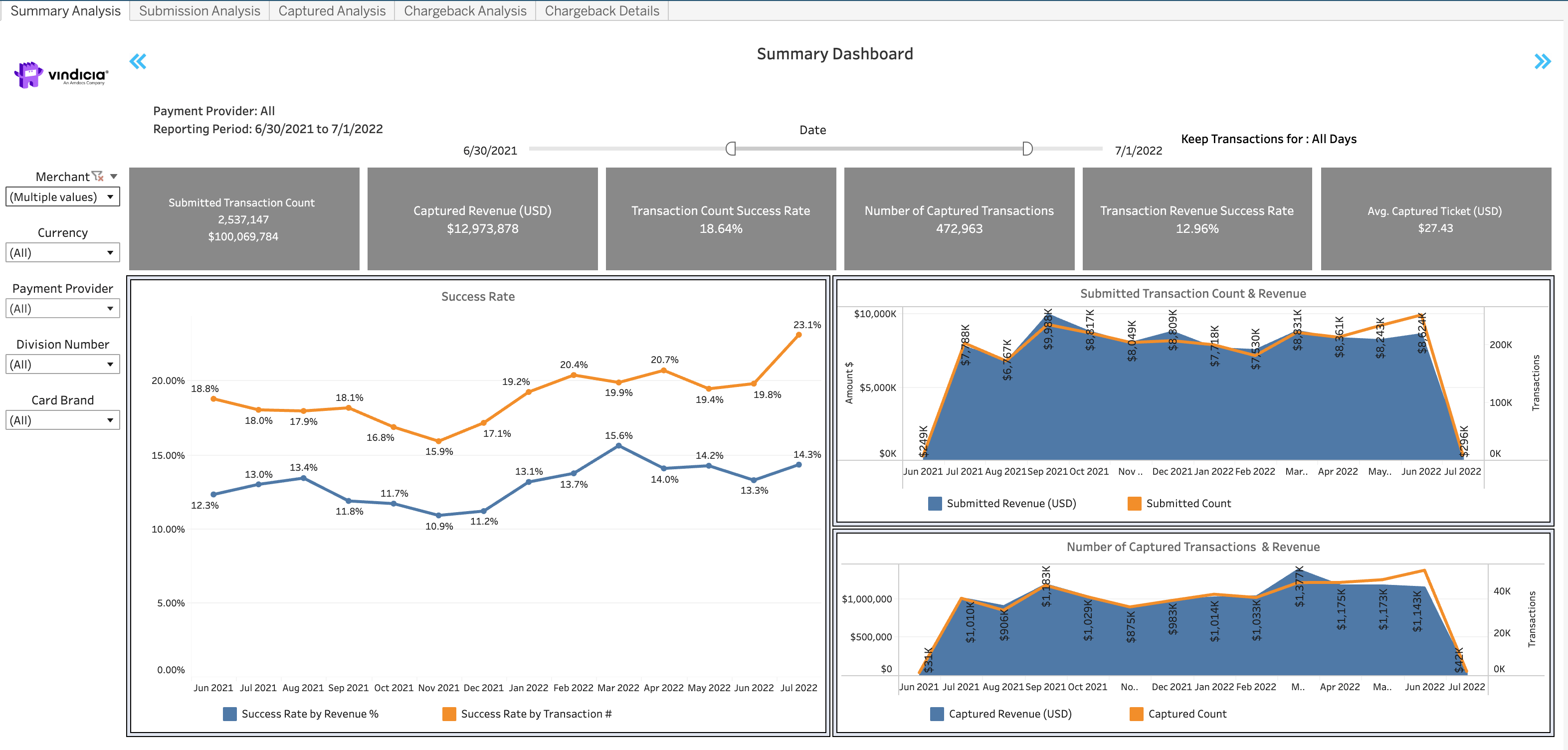
With this release, **Chargeback Details** and **Chargeback Analysis** dashboards have been added to Subscribe Subscription Intelligence dashboards, available to view in the Subscribe Merchant Portal. The **Chargeback Analysis** dashboard provides merchants crucial detailed information regarding their chargeback occurrences and rates such as monthly trends, chargebacks by reason types, chargeback resolution, and chargebacks split by reason type. The **Chargeback Details** dashboard provides a list of chargeback reasons by Payment Provider and is filtered by credit card network and reason type. These dashboards are only displayed for merchants that have a chargeback feed configured.
**Tip:** For more details, see the [Subscribe Merchant Portal User Guide](https://docs.vindicia.com/bundle/Subscribe_Portal2_User_Guide/page/Topics/transactionWorking.html).
(PORT-2249)
### Chargeback Information in Subscribe Portal Dashboard
With this release, **Chargeback Details** and **Chargeback Analysis** dashboards have been added to Subscribe Subscription Intelligence dashboards, available to view in the Subscribe Merchant Portal. The **Chargeback Analysis** dashboard provides merchants crucial detailed information regarding their chargeback occurrences and rates such as monthly trends, chargebacks by reason types, chargeback resolution, and chargebacks split by reason type. The **Chargeback Details** dashboard provides a list of chargeback reasons by Payment Provider and is filtered by credit card network and reason type. These dashboards are only displayed for merchants that have a chargeback feed configured.
 (TABL-69)
### Push Notification - Credit Card Expiration Added in Subscription Class
In this release, Subscribe added a Credit Card Expiration push notification message, sent a specified number of months before a credit card expires. The push notification sends the **Autobill** (Subscription) object and includes the account that the subscription is associated with and the card that is about to expire. The notification for credit card expiration is sent a specified number of months before the expiration, based on the Billing Plan value of **credit\_card\_expiration\_warning** attribute.
To use this feature, contact Vindicia Client Technical Support to enable the new Push Notification platform.
**Tip:** For more details, see the [Vindicia Subscribe API Programming Guide](https://docs.vindicia.com/bundle/SOAP-Programming-guide/page/topics/Event_Class__Subscriptio.html).
(VIN-17577)
### Subscribe Rest API - Optional Status filter for List Subscription
The Subscribe Rest API **List (All) Subscriptions** call has been enhanced with a new, optional status query parameter that allows you to filter the list of subscriptions per account by status. This default value of the query parameter is **all** so that when not indicated, all the subscriptions (in all statuses) are returned.
**Tip:** For more details, see the [Subscribe REST API Guide](https://docs.vindicia.com/bundle/Subscribe_REST_API_Guide/page/topics/List_all_Subscriptions.html)
## Payments Features
This release includes the following new Payment features:
### Stripe Integration - Payment Intent API Support in Retain
Starting this release, Vindicia has established an additional integration with Stripe by supporting Stripe's latest Payment Intent API.
The integration supports credit cards, debit cards, and tokenized credit cards in US Dollars for the following main areas:
* One time Payment
* Non-Free Trial Payment
* Recurring Payment
* Void Payment
* Refund Payment
* Retain support - Full auth and capture (level one), using Tokens
**Note:** This feature is currently only available for Retain. Merchants that want to use this feature, please contact Vindicia Client Technical Support.
(VIN-1172)
### Adyen Integration - Improvements to the Transaction Authorization Response
Previously, when a transaction authorization attempt via Adyen failed, Subscribe returned a high-level failure response code from the Adyen response to the merchant. In this release, a more detailed response code is returned in the transaction authorization response.
(VIN-18373)
### Truust Integration - Support for Truust Hosted Pages Payment Method in Subscribe Rest API
In previous releases, support was added for Truust payment provider.
In this release, support was added in Subscribe REST API for using the Subscribe Hosted Pages Payment Method with the Truust integration.
To achieve this, merchants need to enter the Hosted Pages Object **billing\_agreement\_id** attribute in the following format:
```
billing_agreement_id => '{"subscription_plan": "792022309331179", "card_id": 7415}',
```
Additionally, the **buyer\_id** is required as a Name-Value Pair in the Payment Method metadata attribute as follows:
```
metadata => {
'Truust:buyer_id' => 'the customer_id in the Truust system'
},
```
(VIN-19126)
## Bug Fixes
The following issues were solved in this release:
| Ticket | Title | Description |
| - | - | - |
| PORT-2321 | Subscribe Merchant Portal 2.0 - Change Payment method for subscriptions | In the Subscribe Merchant Portal 2.0, it was difficult to locate the primary (default) payment method in the Accounts page. The following changes were made: - The Set Primary setting has been added as an action in the Account page view mode. - An **Is Primary** column has been added to the Payment Methods pane to indicate which payment method is set as the primary payment method for a more intuitive user experience. - When you apply changes only to the Payment Method for an account, your changes are submitted and no other changes are required. |
| PORT-2341 | Subscribe Merchant Portal 2.0 - Reason Codes Small Fixes | The following updates related to Reason Codes were made: - In the **Cancel Subscription** pop-up form, the **Cancel Reason** field now appears as **Reason Code**. - In the Invoice Aging By Due Date and Invoice Aging By Invoice Date reports the **Subscription Cancel Reason** columns now appear as **Subscription Reason Code**. - In the Invoice Aging By Due Date and Invoice Aging By Invoice Date reports the **AutoBill Cancel Code** CSV exported column now appears as **AutoBill Reason Code**. - On the Reason Codes list page the default filter option for **Type** has been changed from **Cancel** to **All**. |
| PORT-2365 | Subscribe Merchant Portal 2.0 - Campaign Cancellation | Previously, there was no additional confirmation that appeared when users clicked **Cancel Campaign**, leading some campaigns to be canceled by accident. Users are now given an additional confirmation prompt when to cancelling campaigns. |
| PORT-2402 | Subscribe Merchant Portal 2.0 - Not Able to Edit Inactive Campaign - Promotion Type | Users were not able to edit inactive Promotion Campaigns. The issue has been corrected. |
| VIN-15265 | Chargeback Status | Previously, chargebacks that have a **RV** (Reversal) status were automatically marked as **New**. Merchants that use Chase as a payment provider, can ask Vindicia to set a configuration to indicate whether chargebacks that have a **RV** (Reversal) status are marked as **Won**. |
| VIN-17073 | Decline Recovery Report was not Generated | Scheduling a Decline Recovery Report did not work as expected. This issue has been corrected. |
| VIN-17967 | Search Transactions by last 4 digits of a credit card | In Subscribe Merchant Portal 2.0, the Transaction search by partial credit card (either last four digits of the credit card or first six digits (BIN) and last four digits of the card) timed out. This has been fixed. |
| VIN-18189 | Reports 1.0 - Merchant Users report display | An issue occurred In the Merchant Users report whereby user statuses were not displayed. This has been fixed. |
| VIN-18307 | Rest API - Account List Pagination | In case of pagination, the next value was not populated correctly, blocking the merchants to paginate on the results. This was not fixed. |
| VIN-18525 | WorldPay Integration - Refunds are Marked as Pending Instead of Completed | Due to changes on the payment processors side, refunds processed through WorldPay were not marked as Final. This issue has been corrected. |
| VIN-18630 | Smartpay Integration - handling CIT/MIT (COF) indicators | Indicators sent for customer initiated transactions were modified to differentiate between the first transaction of a subscription and an unscheduled transaction. |
| VIN-18972 | Unable to Edit Some Existing Products | An internal server error occurred when edited some existing products. This has been fixed. |
| VIN-18828 | Customer Information in Stripe Charges Integration | Previously, not all customer information that was received was sent to the Stripe Charges platform. This has been corrected, and the following values are sent, if they are present, in the API call to Vindicia. `"email": "", "address": { "city": "", "country": "", "line1": "", "line2": "", "postal_code": "", "state": "" },` |
| VIN-19319 | Subscriptions Erroneously Cancelled | Subscriptions that did not have an **Activation Date** set were sometimes cancelled. This has been fixed. |
| PORT-2461 | Unable to Create Custom Data Values and Name Value Pairs | In Subscribe Merchant Portal 2.0, users could not create new Custom Data Values/Name Value Pairs. This has been fixed. |
### Known Issues
This release has the following known issues.
* In Subscribe Merchant Portal 2.0, when applying a discount to an existing Subscription, the campaign code field per Subscription Item displays an error.
As a workaround, use the subscription level Campaign Code field instead to apply the discount. All applicable Products and Billing Plans in the Subscription will be discounted. For more details, see [FAQ in the Subscribe Portal User Guide](https://docs.vindicia.com/bundle/Subscribe_Portal2_User_Guide/page/Topics/FAQ.html). (VIN-16925)
* In Subscribe Merchant Portal 2.0, when attempting to log in using Chrome, users are receiving a **Session Expired** error.
To fix this issue, complete the following steps:
1. In Chrome, click **More**
(TABL-69)
### Push Notification - Credit Card Expiration Added in Subscription Class
In this release, Subscribe added a Credit Card Expiration push notification message, sent a specified number of months before a credit card expires. The push notification sends the **Autobill** (Subscription) object and includes the account that the subscription is associated with and the card that is about to expire. The notification for credit card expiration is sent a specified number of months before the expiration, based on the Billing Plan value of **credit\_card\_expiration\_warning** attribute.
To use this feature, contact Vindicia Client Technical Support to enable the new Push Notification platform.
**Tip:** For more details, see the [Vindicia Subscribe API Programming Guide](https://docs.vindicia.com/bundle/SOAP-Programming-guide/page/topics/Event_Class__Subscriptio.html).
(VIN-17577)
### Subscribe Rest API - Optional Status filter for List Subscription
The Subscribe Rest API **List (All) Subscriptions** call has been enhanced with a new, optional status query parameter that allows you to filter the list of subscriptions per account by status. This default value of the query parameter is **all** so that when not indicated, all the subscriptions (in all statuses) are returned.
**Tip:** For more details, see the [Subscribe REST API Guide](https://docs.vindicia.com/bundle/Subscribe_REST_API_Guide/page/topics/List_all_Subscriptions.html)
## Payments Features
This release includes the following new Payment features:
### Stripe Integration - Payment Intent API Support in Retain
Starting this release, Vindicia has established an additional integration with Stripe by supporting Stripe's latest Payment Intent API.
The integration supports credit cards, debit cards, and tokenized credit cards in US Dollars for the following main areas:
* One time Payment
* Non-Free Trial Payment
* Recurring Payment
* Void Payment
* Refund Payment
* Retain support - Full auth and capture (level one), using Tokens
**Note:** This feature is currently only available for Retain. Merchants that want to use this feature, please contact Vindicia Client Technical Support.
(VIN-1172)
### Adyen Integration - Improvements to the Transaction Authorization Response
Previously, when a transaction authorization attempt via Adyen failed, Subscribe returned a high-level failure response code from the Adyen response to the merchant. In this release, a more detailed response code is returned in the transaction authorization response.
(VIN-18373)
### Truust Integration - Support for Truust Hosted Pages Payment Method in Subscribe Rest API
In previous releases, support was added for Truust payment provider.
In this release, support was added in Subscribe REST API for using the Subscribe Hosted Pages Payment Method with the Truust integration.
To achieve this, merchants need to enter the Hosted Pages Object **billing\_agreement\_id** attribute in the following format:
```
billing_agreement_id => '{"subscription_plan": "792022309331179", "card_id": 7415}',
```
Additionally, the **buyer\_id** is required as a Name-Value Pair in the Payment Method metadata attribute as follows:
```
metadata => {
'Truust:buyer_id' => 'the customer_id in the Truust system'
},
```
(VIN-19126)
## Bug Fixes
The following issues were solved in this release:
| Ticket | Title | Description |
| - | - | - |
| PORT-2321 | Subscribe Merchant Portal 2.0 - Change Payment method for subscriptions | In the Subscribe Merchant Portal 2.0, it was difficult to locate the primary (default) payment method in the Accounts page. The following changes were made: - The Set Primary setting has been added as an action in the Account page view mode. - An **Is Primary** column has been added to the Payment Methods pane to indicate which payment method is set as the primary payment method for a more intuitive user experience. - When you apply changes only to the Payment Method for an account, your changes are submitted and no other changes are required. |
| PORT-2341 | Subscribe Merchant Portal 2.0 - Reason Codes Small Fixes | The following updates related to Reason Codes were made: - In the **Cancel Subscription** pop-up form, the **Cancel Reason** field now appears as **Reason Code**. - In the Invoice Aging By Due Date and Invoice Aging By Invoice Date reports the **Subscription Cancel Reason** columns now appear as **Subscription Reason Code**. - In the Invoice Aging By Due Date and Invoice Aging By Invoice Date reports the **AutoBill Cancel Code** CSV exported column now appears as **AutoBill Reason Code**. - On the Reason Codes list page the default filter option for **Type** has been changed from **Cancel** to **All**. |
| PORT-2365 | Subscribe Merchant Portal 2.0 - Campaign Cancellation | Previously, there was no additional confirmation that appeared when users clicked **Cancel Campaign**, leading some campaigns to be canceled by accident. Users are now given an additional confirmation prompt when to cancelling campaigns. |
| PORT-2402 | Subscribe Merchant Portal 2.0 - Not Able to Edit Inactive Campaign - Promotion Type | Users were not able to edit inactive Promotion Campaigns. The issue has been corrected. |
| VIN-15265 | Chargeback Status | Previously, chargebacks that have a **RV** (Reversal) status were automatically marked as **New**. Merchants that use Chase as a payment provider, can ask Vindicia to set a configuration to indicate whether chargebacks that have a **RV** (Reversal) status are marked as **Won**. |
| VIN-17073 | Decline Recovery Report was not Generated | Scheduling a Decline Recovery Report did not work as expected. This issue has been corrected. |
| VIN-17967 | Search Transactions by last 4 digits of a credit card | In Subscribe Merchant Portal 2.0, the Transaction search by partial credit card (either last four digits of the credit card or first six digits (BIN) and last four digits of the card) timed out. This has been fixed. |
| VIN-18189 | Reports 1.0 - Merchant Users report display | An issue occurred In the Merchant Users report whereby user statuses were not displayed. This has been fixed. |
| VIN-18307 | Rest API - Account List Pagination | In case of pagination, the next value was not populated correctly, blocking the merchants to paginate on the results. This was not fixed. |
| VIN-18525 | WorldPay Integration - Refunds are Marked as Pending Instead of Completed | Due to changes on the payment processors side, refunds processed through WorldPay were not marked as Final. This issue has been corrected. |
| VIN-18630 | Smartpay Integration - handling CIT/MIT (COF) indicators | Indicators sent for customer initiated transactions were modified to differentiate between the first transaction of a subscription and an unscheduled transaction. |
| VIN-18972 | Unable to Edit Some Existing Products | An internal server error occurred when edited some existing products. This has been fixed. |
| VIN-18828 | Customer Information in Stripe Charges Integration | Previously, not all customer information that was received was sent to the Stripe Charges platform. This has been corrected, and the following values are sent, if they are present, in the API call to Vindicia. `"email": "", "address": { "city": "", "country": "", "line1": "", "line2": "", "postal_code": "", "state": "" },` |
| VIN-19319 | Subscriptions Erroneously Cancelled | Subscriptions that did not have an **Activation Date** set were sometimes cancelled. This has been fixed. |
| PORT-2461 | Unable to Create Custom Data Values and Name Value Pairs | In Subscribe Merchant Portal 2.0, users could not create new Custom Data Values/Name Value Pairs. This has been fixed. |
### Known Issues
This release has the following known issues.
* In Subscribe Merchant Portal 2.0, when applying a discount to an existing Subscription, the campaign code field per Subscription Item displays an error.
As a workaround, use the subscription level Campaign Code field instead to apply the discount. All applicable Products and Billing Plans in the Subscription will be discounted. For more details, see [FAQ in the Subscribe Portal User Guide](https://docs.vindicia.com/bundle/Subscribe_Portal2_User_Guide/page/Topics/FAQ.html). (VIN-16925)
* In Subscribe Merchant Portal 2.0, when attempting to log in using Chrome, users are receiving a **Session Expired** error.
To fix this issue, complete the following steps:
1. In Chrome, click **More**  icon at the top right.
2. Click **More Tools** > **Clear Browsing Data**.
3. Select a **Time Range** value of **All Time**.
4. Select the **Cookies and Other Site Data** and **Cached Images and Files** check boxes.
5. Click **Clear Data**.
(PORT-2506)
This documentation is built and hosted on [Mintlify](https://mintlify.com), a developer documentation platform.
icon at the top right.
2. Click **More Tools** > **Clear Browsing Data**.
3. Select a **Time Range** value of **All Time**.
4. Select the **Cookies and Other Site Data** and **Cached Images and Files** check boxes.
5. Click **Clear Data**.
(PORT-2506)
This documentation is built and hosted on [Mintlify](https://mintlify.com), a developer documentation platform.