> ## Documentation Index
> Fetch the complete documentation index at: https://docs.slm.m1amdocs.com/llms.txt
> Use this file to discover all available pages before exploring further.
# Resume a Subscription
Resume a paused Subscription and restart service entitlements as defined in the Subscription associated billing plan, or any active products. The subscription resumes based on the defined date.
To resume a subscription:
1. Access the subscription from **Billing** > **Subscriptions**.
2. Click **Resume Subscription** in the **Actions** Panel.
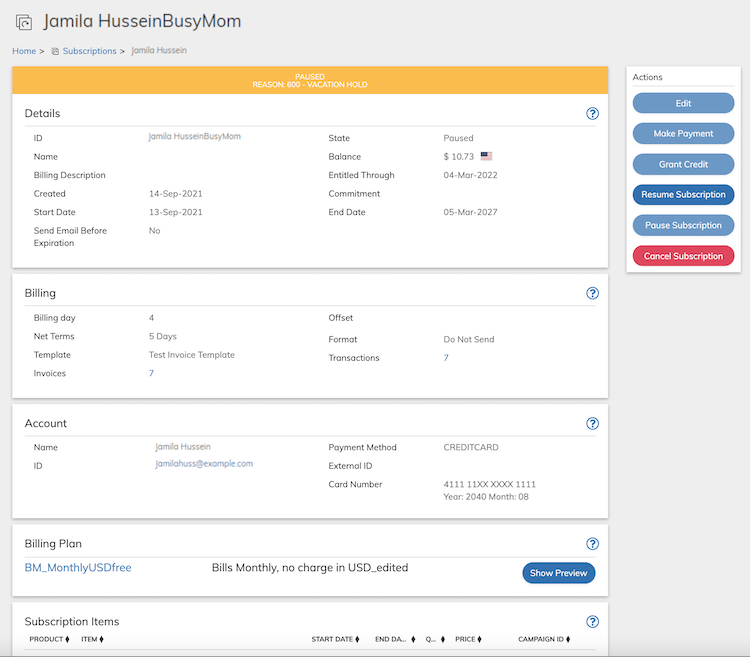 **Note:** **Resume Subscription** button is active only if the current subscription state is either Paused or Pending Pause.
The Resume Subscription dialog box appears.
**Note:** **Resume Subscription** button is active only if the current subscription state is either Paused or Pending Pause.
The Resume Subscription dialog box appears.
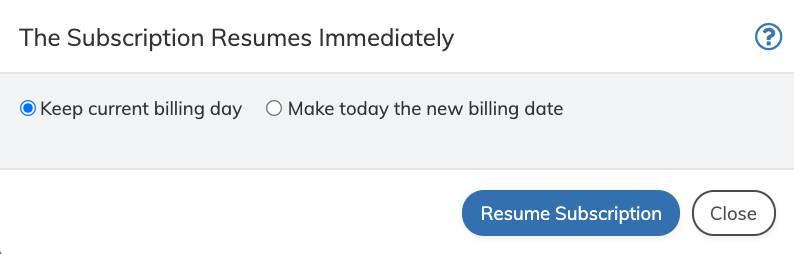 3. Define the fields as needed. Refer to the table below for guidance regarding the fields.
4.
| Field | Guidance | Relevancy |
| - | - | - |
| **Keep Current Billing Date** | Select this to resume the subscription without resetting the billing cycle. It sets the original billing date as defined in the Subscription. This is the Default value. | Required |
| **Make today the new billing date** | Select this to resume the subscription and reset the billing cycle, starting the day of resume request. | Required |
5. Click **Resume Subscription** in the Resume Subscription dialog box.
The subscription is resumed and reset to an Active state.
**Parent topic:**[Subscriptions](../topics/subscriptionAbout)
**Parent topic:**[Working with Subscriptions](../topics/subscriptionWorking)
This documentation is built and hosted on [Mintlify](https://mintlify.com), a developer documentation platform.
3. Define the fields as needed. Refer to the table below for guidance regarding the fields.
4.
| Field | Guidance | Relevancy |
| - | - | - |
| **Keep Current Billing Date** | Select this to resume the subscription without resetting the billing cycle. It sets the original billing date as defined in the Subscription. This is the Default value. | Required |
| **Make today the new billing date** | Select this to resume the subscription and reset the billing cycle, starting the day of resume request. | Required |
5. Click **Resume Subscription** in the Resume Subscription dialog box.
The subscription is resumed and reset to an Active state.
**Parent topic:**[Subscriptions](../topics/subscriptionAbout)
**Parent topic:**[Working with Subscriptions](../topics/subscriptionWorking)
This documentation is built and hosted on [Mintlify](https://mintlify.com), a developer documentation platform.