> ## Documentation Index
> Fetch the complete documentation index at: https://docs.slm.m1amdocs.com/llms.txt
> Use this file to discover all available pages before exploring further.
# User Account and Settings
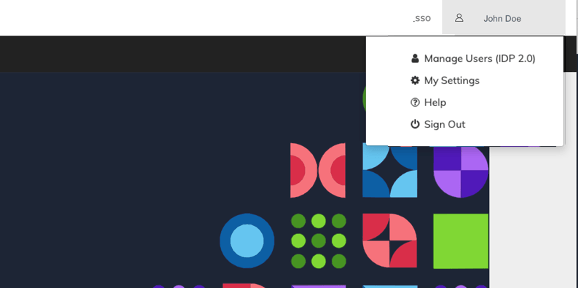
The **Subscribe Merchant** Portal Account Settings are available from the top right corner of your screen, under your Portal account name.
The Portal account Settings let you perform the following:
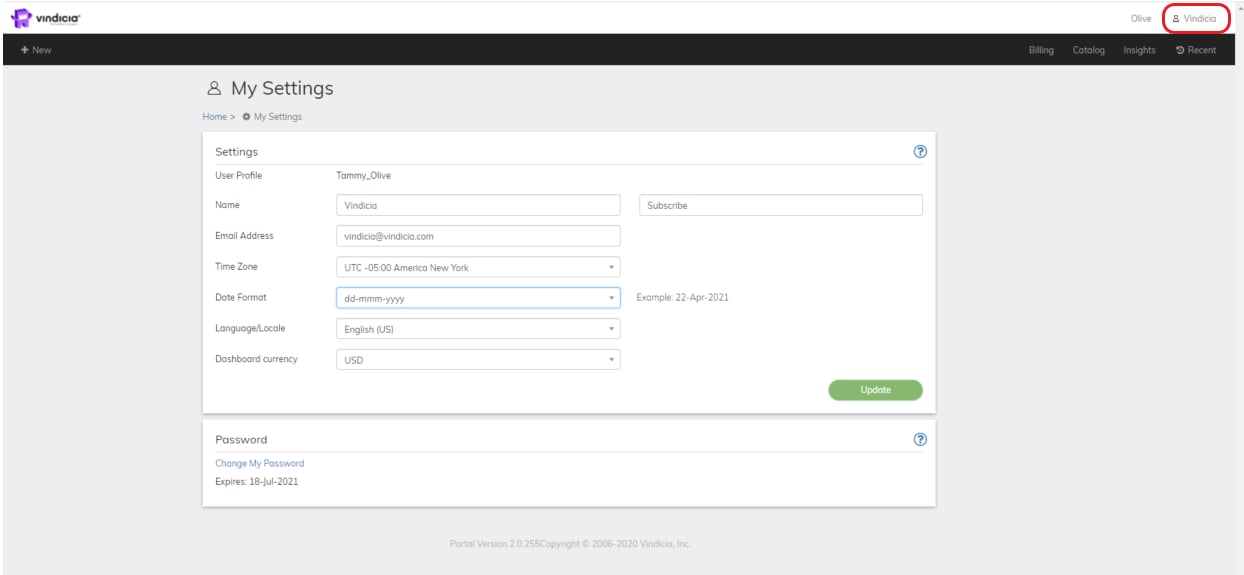
* Configure [**My Settings**](settings): Your personal account area, which provides customizable settings for your account.
* **Manage Users**: Merchant Admins (Super User) can access User Management in the Vindicia IDP console.
* In My Settings area, request a new [**Password**](password) for existing merchants or [**access Vindicia IDP to change your sign in credentials**](vindiciaIDPSignInCred).
* **Help**: Access the full online help guide for contextual guidance within the portal. The online help opens in a new tab.
* **Sign out**: Leave the Vindicia Merchant Portal.
 * **[Portal My Settings](../topics/settings)**\
Your personal account area, which provides customizable settings for your account.
* **[Subscribe Portal User Roles and Access](../topics/portalUserRoles)**\
During the Subscribe implementation phase, designate authorized users that can access the Subscribe Portal. One of these users must be named a Super User, who has high-level administrator access to all the objects.
* **[User Sign In - Vindicia IDP](../topics/vindiciaIDPSignInCred)**\
Vindicia products are built to keep data secure and compliant and meet Payment Card Industry (PCI) SSAE-18 SOC 1 Type 2 and SOC 2 Type 2 requirements and ISO 27001 security requirements. Accordingly, Vindicia's merchant Portal users sign in to the Portal via Vindicia's IDP (Identity Provider) app. Users define their own password and can reset it within the simple-to-use Identity Provider app.
* **[External User Sign In](../topics/userSignIn)**\
Vindicia products are built to keep data secure and compliant and meet Payment Card Industry (PCI) security requirements. Your organization uses an external identity management system for authentication and log in to the Vindicia Merchant Portal .
* **[Portal Password](../topics/password)**\
Portal users are assigned a randomly generated password that meet Payment Card Industry (PCI) SSAE-18 SOC 1 Type 2 and SOC 2 Type 2 requirements and ISO 27001 security requirements. Vindicia's Portal provides a password of at least 8 characters and strong Password complexity. Users are blocked after 5 invalid access attempts.
This documentation is built and hosted on [Mintlify](https://mintlify.com), a developer documentation platform.
* **[Portal My Settings](../topics/settings)**\
Your personal account area, which provides customizable settings for your account.
* **[Subscribe Portal User Roles and Access](../topics/portalUserRoles)**\
During the Subscribe implementation phase, designate authorized users that can access the Subscribe Portal. One of these users must be named a Super User, who has high-level administrator access to all the objects.
* **[User Sign In - Vindicia IDP](../topics/vindiciaIDPSignInCred)**\
Vindicia products are built to keep data secure and compliant and meet Payment Card Industry (PCI) SSAE-18 SOC 1 Type 2 and SOC 2 Type 2 requirements and ISO 27001 security requirements. Accordingly, Vindicia's merchant Portal users sign in to the Portal via Vindicia's IDP (Identity Provider) app. Users define their own password and can reset it within the simple-to-use Identity Provider app.
* **[External User Sign In](../topics/userSignIn)**\
Vindicia products are built to keep data secure and compliant and meet Payment Card Industry (PCI) security requirements. Your organization uses an external identity management system for authentication and log in to the Vindicia Merchant Portal .
* **[Portal Password](../topics/password)**\
Portal users are assigned a randomly generated password that meet Payment Card Industry (PCI) SSAE-18 SOC 1 Type 2 and SOC 2 Type 2 requirements and ISO 27001 security requirements. Vindicia's Portal provides a password of at least 8 characters and strong Password complexity. Users are blocked after 5 invalid access attempts.
This documentation is built and hosted on [Mintlify](https://mintlify.com), a developer documentation platform.