> ## Documentation Index
> Fetch the complete documentation index at: https://docs.slm.m1amdocs.com/llms.txt
> Use this file to discover all available pages before exploring further.
# Revenue By Product
Revenue by Product provides insights on how much revenue different products generate each month. This dashboard allows you to see which of your products are generating the most revenue whether from a one-time purchase or from subscriptions.
**Note:** Only products with revenue greater than 0 appear in this dashboard. To see data displaying the number of active subscriptions per product, see the Active Subscription per Product chart on the [Subscriber Insights](dashboardCustomerInsight) tab.
**Directions:**
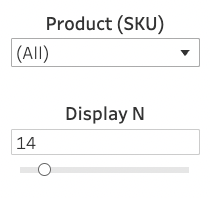 * In the **Product (SKU)** dropdown list, select specific products to appear or leave **All** selected to include all products.
* Use the **Display N** slider to select the number of products displayed in the chart. If you have all products selected in the **Product (SKU)** dropdown list, the **Display N** filter narrows down the results to the selected number of top performing products.
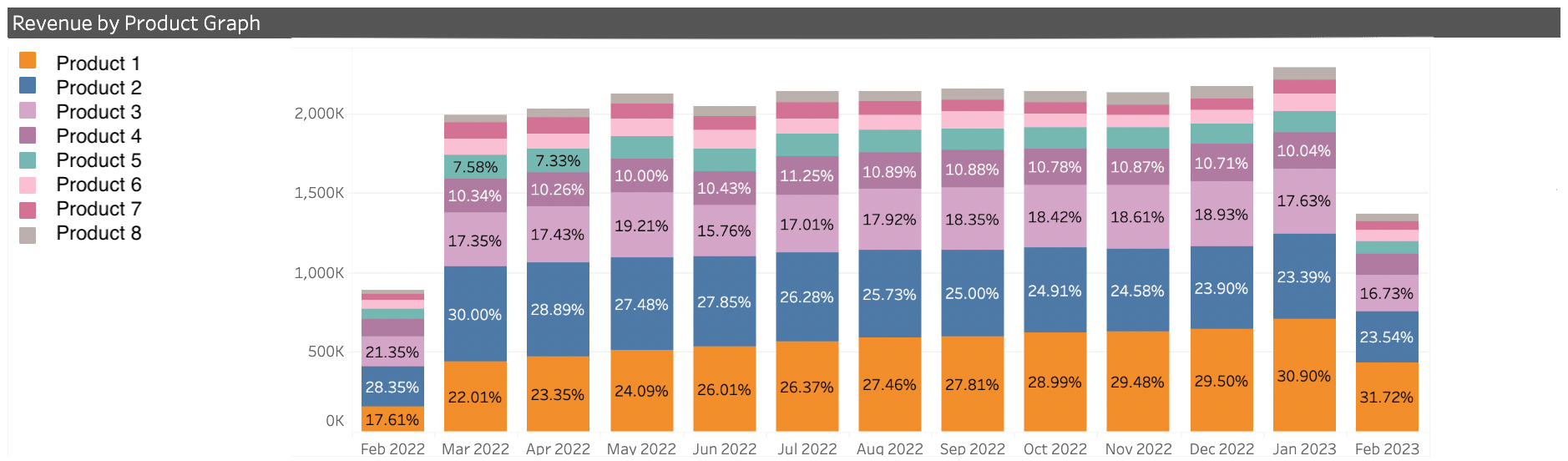
* **Revenue By Product Graph** - This graph shows the percentage of your monthly revenue that each displayed product generated over the past 12 months. To see your top perfoming products, select **All** in the **Product (SKU)** dropdown list
* In the **Product (SKU)** dropdown list, select specific products to appear or leave **All** selected to include all products.
* Use the **Display N** slider to select the number of products displayed in the chart. If you have all products selected in the **Product (SKU)** dropdown list, the **Display N** filter narrows down the results to the selected number of top performing products.
* **Revenue By Product Graph** - This graph shows the percentage of your monthly revenue that each displayed product generated over the past 12 months. To see your top perfoming products, select **All** in the **Product (SKU)** dropdown list
 **Note:** The data for the current month is not complete until the first week of the following month.
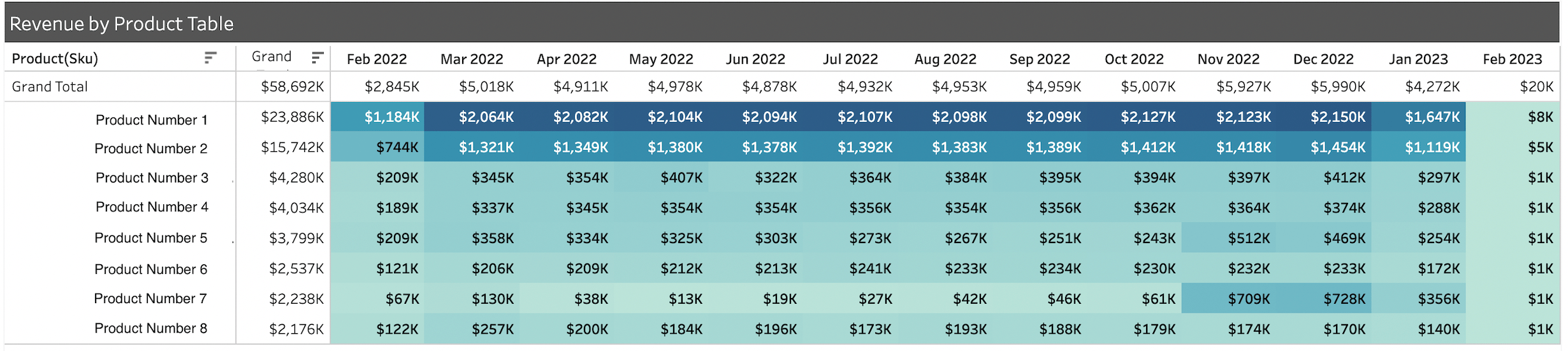
* **Revenue By Product Table** - This table displays the revenue (in US Dollars) generated by each displayed product. It displays the monthly contribution as well as the annual total.
**Note:** The data for the current month is not complete until the first week of the following month.
* **Revenue By Product Table** - This table displays the revenue (in US Dollars) generated by each displayed product. It displays the monthly contribution as well as the annual total.
 **Parent topic:**[Master Dashboard Portal](../topics/dashboardMaster)
**Related information**
[Subscribe Subscription Intelligence Dashboard](dashboardAbout)
[Master Dashboard Portal](dashboardMaster)
[Revenue Insights](dashboardRevenueInsight)
[Subscriber Insights](dashboardCustomerInsight)
[Retention Insights](dashboardChurnInsight)
[Chargeback Analysis Dashboard](dashboardRetainChargebackAnalysis_r)
This documentation is built and hosted on [Mintlify](https://mintlify.com), a developer documentation platform.
**Parent topic:**[Master Dashboard Portal](../topics/dashboardMaster)
**Related information**
[Subscribe Subscription Intelligence Dashboard](dashboardAbout)
[Master Dashboard Portal](dashboardMaster)
[Revenue Insights](dashboardRevenueInsight)
[Subscriber Insights](dashboardCustomerInsight)
[Retention Insights](dashboardChurnInsight)
[Chargeback Analysis Dashboard](dashboardRetainChargebackAnalysis_r)
This documentation is built and hosted on [Mintlify](https://mintlify.com), a developer documentation platform.