> ## Documentation Index
> Fetch the complete documentation index at: https://docs.slm.m1amdocs.com/llms.txt
> Use this file to discover all available pages before exploring further.
# HOA Server Work Flow
This section describes the data flow from the customer’s browser through your website servers, to the Subscribe `WebSession` servers and the Subscribe database.
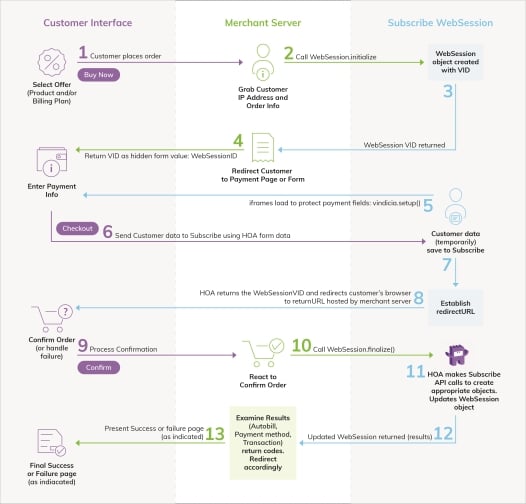 1. Your customer requests a page from your Web application (makes an HTTP call to your Web site), such as your Order page, which requires that they submit payment information.
2. Call `WebSession.initialize()` in the Subscribe API to initialize a `WebSession` object on the Vindicia server. In the `WebSession` object, specify two key attributes:
* The IP address from which the customer requested the order form. For example: `billing_CODE_ONLY.php:$ws->setIpAddress($ip_address);`
* The API call HOA should make when the customer submits the form. For example, calling `PaymentMethod.update()` allows you to create a new payment method. For example: ``
The `initialize` call creates a `WebSession` object, which may include a `method` data member. You can use this data member to specify the SOAP call for which this WebSession is acting as proxy. Valid input includes:
* `Account_Update`
* `Account_UpdatePaymentMethod`
* `AutoBill_Update`
* `PaymentMethod_Update`
* `PaymentMethod_Validate`
* `Transaction_Auth`
* `Transaction_AuthCapture`
(The `initialize` call takes several parameters to mitigate the risk of an unauthenticated call.)
**Note:** To help Vindicia assess fraud risk, capture the customer’s IP address. This aids the Vindicia ChargeGuard team in chargeback investigations.
3. After the `initialize()` call is made, the `WebSession` object returns a Vindicia ID (VID).
This VID is used to track the HOA session, and serves as a means of control and authentication. Only one VID is generated per session, and it has a time limit for validity.
Subscribe returns the `WebSession` `VID` to your application in response to the `initialize()` call. Other form elements, hidden or to be provided by the customer, must be consistent with the data required to complete a `PaymentMethod.update()` call (or other API call, listed above). The form's action URL points to the HOA address on the Vindicia server.
4. Return the checkout form from the merchant server to the browser with this`VID.` This will be a hidden field called `WebSessionId.`
**Note:** Steps 1 through 4 are parts of a single synchronous call and response chain initiated by the customer's request for the order form.
5. As the page loads in the browser, iframes will load from Vindicia.com to protect sensitive payment fields (Hosted Fields).
6. The customer fills out your form, and clicks `Save` or `Submit`. The entire form, including the hidden `VID` is posted directly to the Vindicia servers. Your server is bypassed completely with this form submission..
**Note:** The customer must complete the form within one hour (the default expiration time), or within your specified expiration time, after which Subscribe marks the `WebSession` object expired.
7. Vindicia saves the form data to Subscribe in a temporary area. HOA loads the `WebSession` object with `vin_WebSession_VID`, which accompanied the form, and stores the data submitted by the order form. Note that HOA does not make the API call to create the `PaymentMethod` object at this point in the process. At this point you need only pass in the object attributes you have collected—the remainder can be passed in with the `WebSession.finalize` call (Step 10).
8. Subscribe returns the `redirectURL` back to the browser. If you’re using a pure Ajax solution, the `onSubmitCompleteEvent` is called. Otherwise the browser is redirected to this URL. This URL (the `redirectURL`) is either your confirmation page or your error page that you previously defined in your web session.
9. The browser is either redirected to the merchant page or process for completing the order, or an Ajax call is made to indicate success to the merchant server. The redirect carries the `VID` for the `WebSession` back to the merchant site, allowing you to finalize this session
10. Within the page or process resulting from confirmation or Ajax call on the merchant server, you execute a `WebSession.finalize` SOAP call to Vindicia.
When you call `finalize`, simply pass in the ID of the sparse `webSession` object (the VID). Do not populate any `privateFormValues` or `post` values. In rare cases, you can pass in `MethodParamValues`—for example if you want to pass in a campaign code to an AutoBill.update call after collecting it in the payment form.
`WebSession.finalize` returns both the WebSession results and the result for the underlying API calls. (For more information, see Section 19: The WebSession Object in the **Subscribe API Guide**.) You can also pass other parameters for the Subscribe method that you did not pass initially.
11. During the Subscribe `finalize`, all temporary session data is converted to objects in the Vindicia database, which Subscribe begins processing immediately. For example, a new AutoBill might capture the funds on a first transaction.
12. The `results` returned by the `finalize()` call contain enough information to either present a Thank You page to the customer or satisfy your Ajax function call, or react to any errors in case more action is required from the customer.
13. Your merchant server page communicates results to the browser, either through an HTML or an Ajax response.
**Parent topic:**[HOA with Hosted Fields Process Flow](../topics/HOA_with_Hosted_Fields_P)
This documentation is built and hosted on [Mintlify](https://mintlify.com), a developer documentation platform.
1. Your customer requests a page from your Web application (makes an HTTP call to your Web site), such as your Order page, which requires that they submit payment information.
2. Call `WebSession.initialize()` in the Subscribe API to initialize a `WebSession` object on the Vindicia server. In the `WebSession` object, specify two key attributes:
* The IP address from which the customer requested the order form. For example: `billing_CODE_ONLY.php:$ws->setIpAddress($ip_address);`
* The API call HOA should make when the customer submits the form. For example, calling `PaymentMethod.update()` allows you to create a new payment method. For example: ``
The `initialize` call creates a `WebSession` object, which may include a `method` data member. You can use this data member to specify the SOAP call for which this WebSession is acting as proxy. Valid input includes:
* `Account_Update`
* `Account_UpdatePaymentMethod`
* `AutoBill_Update`
* `PaymentMethod_Update`
* `PaymentMethod_Validate`
* `Transaction_Auth`
* `Transaction_AuthCapture`
(The `initialize` call takes several parameters to mitigate the risk of an unauthenticated call.)
**Note:** To help Vindicia assess fraud risk, capture the customer’s IP address. This aids the Vindicia ChargeGuard team in chargeback investigations.
3. After the `initialize()` call is made, the `WebSession` object returns a Vindicia ID (VID).
This VID is used to track the HOA session, and serves as a means of control and authentication. Only one VID is generated per session, and it has a time limit for validity.
Subscribe returns the `WebSession` `VID` to your application in response to the `initialize()` call. Other form elements, hidden or to be provided by the customer, must be consistent with the data required to complete a `PaymentMethod.update()` call (or other API call, listed above). The form's action URL points to the HOA address on the Vindicia server.
4. Return the checkout form from the merchant server to the browser with this`VID.` This will be a hidden field called `WebSessionId.`
**Note:** Steps 1 through 4 are parts of a single synchronous call and response chain initiated by the customer's request for the order form.
5. As the page loads in the browser, iframes will load from Vindicia.com to protect sensitive payment fields (Hosted Fields).
6. The customer fills out your form, and clicks `Save` or `Submit`. The entire form, including the hidden `VID` is posted directly to the Vindicia servers. Your server is bypassed completely with this form submission..
**Note:** The customer must complete the form within one hour (the default expiration time), or within your specified expiration time, after which Subscribe marks the `WebSession` object expired.
7. Vindicia saves the form data to Subscribe in a temporary area. HOA loads the `WebSession` object with `vin_WebSession_VID`, which accompanied the form, and stores the data submitted by the order form. Note that HOA does not make the API call to create the `PaymentMethod` object at this point in the process. At this point you need only pass in the object attributes you have collected—the remainder can be passed in with the `WebSession.finalize` call (Step 10).
8. Subscribe returns the `redirectURL` back to the browser. If you’re using a pure Ajax solution, the `onSubmitCompleteEvent` is called. Otherwise the browser is redirected to this URL. This URL (the `redirectURL`) is either your confirmation page or your error page that you previously defined in your web session.
9. The browser is either redirected to the merchant page or process for completing the order, or an Ajax call is made to indicate success to the merchant server. The redirect carries the `VID` for the `WebSession` back to the merchant site, allowing you to finalize this session
10. Within the page or process resulting from confirmation or Ajax call on the merchant server, you execute a `WebSession.finalize` SOAP call to Vindicia.
When you call `finalize`, simply pass in the ID of the sparse `webSession` object (the VID). Do not populate any `privateFormValues` or `post` values. In rare cases, you can pass in `MethodParamValues`—for example if you want to pass in a campaign code to an AutoBill.update call after collecting it in the payment form.
`WebSession.finalize` returns both the WebSession results and the result for the underlying API calls. (For more information, see Section 19: The WebSession Object in the **Subscribe API Guide**.) You can also pass other parameters for the Subscribe method that you did not pass initially.
11. During the Subscribe `finalize`, all temporary session data is converted to objects in the Vindicia database, which Subscribe begins processing immediately. For example, a new AutoBill might capture the funds on a first transaction.
12. The `results` returned by the `finalize()` call contain enough information to either present a Thank You page to the customer or satisfy your Ajax function call, or react to any errors in case more action is required from the customer.
13. Your merchant server page communicates results to the browser, either through an HTML or an Ajax response.
**Parent topic:**[HOA with Hosted Fields Process Flow](../topics/HOA_with_Hosted_Fields_P)
This documentation is built and hosted on [Mintlify](https://mintlify.com), a developer documentation platform.